> ## Documentation Index
> Fetch the complete documentation index at: https://docs.crisp.trade/llms.txt
> Use this file to discover all available pages before exploring further.

# Telegram Bot

> Set up wallets, fund your account, analyze traders, and copytrade through Telegram

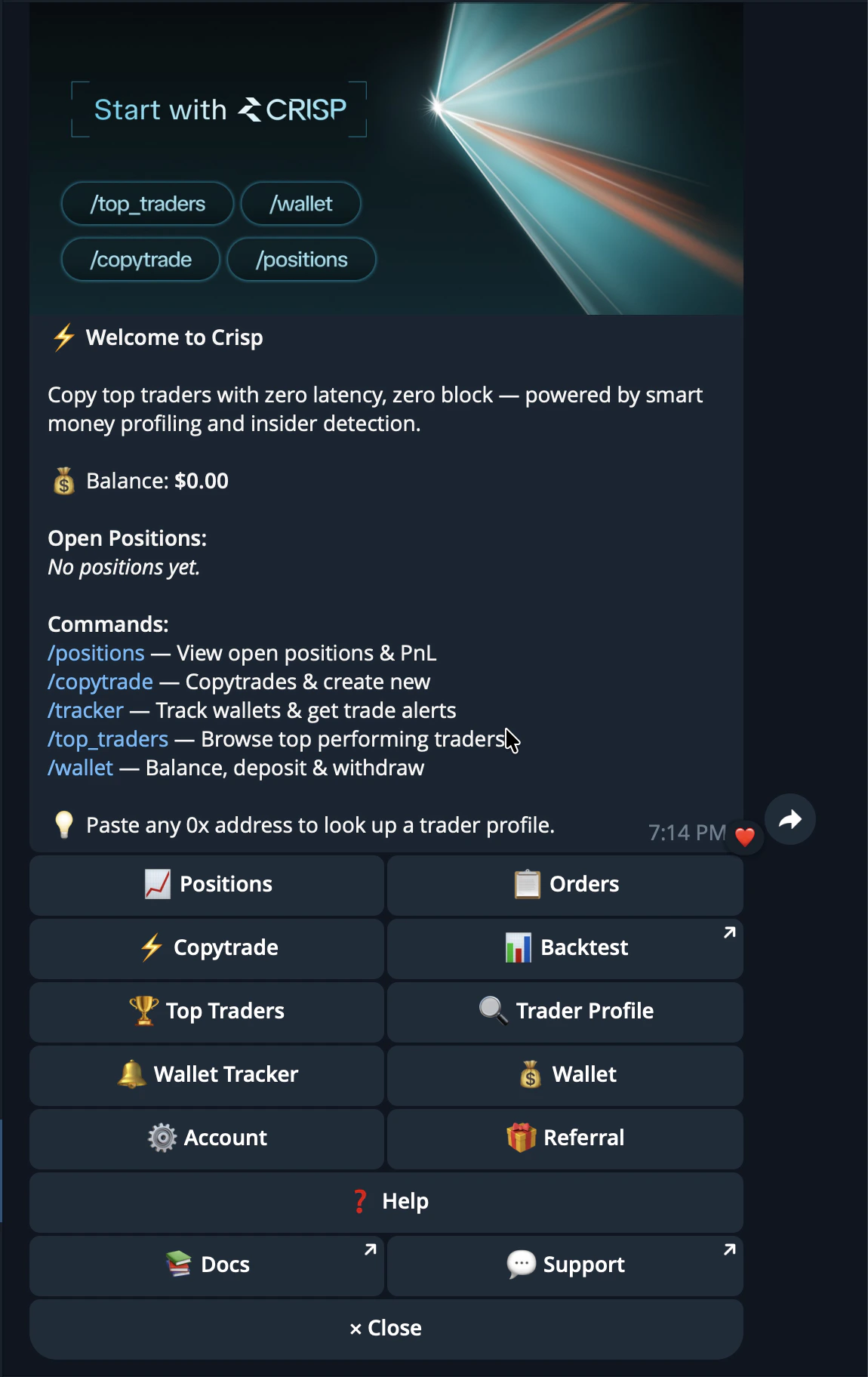
The CRISP Telegram Bot lets you set up your account, fund your wallet, analyze traders, and copy trades directly from Telegram.

<Card title="Start the Bot" icon="paper-plane" href="https://t.me/crisp_trade_bot">
  Message @crisp\_trade\_bot on Telegram
</Card>

<div
  style={{
backgroundColor: "#0b1117",
backgroundImage:
  "linear-gradient(rgba(255,255,255,0.04) 1px, transparent 1px), linear-gradient(90deg, rgba(255,255,255,0.04) 1px, transparent 1px)",
backgroundSize: "40px 40px",
border: "1px solid rgba(255,255,255,0.08)",
borderRadius: "16px",
margin: "32px 0",
padding: "56px 32px",
display: "flex",
justifyContent: "center",
alignItems: "center",
minHeight: "560px",
}}
>
  <img
    src="https://mintcdn.com/crisp-4fe59a67/kz2jxfSUGJcFu5hx/images/telegrambot/startmenu.png?fit=max&auto=format&n=kz2jxfSUGJcFu5hx&q=85&s=138dc300862b25542da05ef22d9bcaf3"
    alt="CRISP Telegram bot welcome screen and start menu"
    style={{
  width: "min(320px, 100%)",
  borderRadius: "14px",
  boxShadow: "0 24px 60px rgba(0,0,0,0.45)",
}}
    width="1150"
    height="1824"
    data-path="images/telegrambot/startmenu.png"
  />
</div>

## Setting Up

Setting up CRISP takes only a few seconds.

CRISP creates your trading wallets automatically through the CRISP Telegram bot, so you can move from onboarding to funding and trading without setting up wallets manually. The wallet system is built with Privy and Gnosis Safe, giving users a non-custodial setup where they remain in control of their keys and funds.

## How setup works

Start by opening the CRISP Telegram bot and sending `/start`.

Once you begin, CRISP automatically creates the wallets needed for your account. These wallets are used to deposit funds, place trades, copytrade, and manage your activity across CRISP.

You do not need to create a separate wallet manually before using CRISP. The setup process is handled inside Telegram so you can get started quickly.

## Wallet creation

CRISP uses Privy and Gnosis Safe wallets to create and manage your account infrastructure.

| Provider    | Role                                                                                |
| ----------- | ----------------------------------------------------------------------------------- |
| Privy       | Handles wallet onboarding and user authentication                                   |
| Gnosis Safe | Provides secure smart wallet infrastructure for managing funds and trading activity |

Together, this gives users a simple setup experience while keeping the wallet architecture secure and non-custodial.

## Non-custodial by design

CRISP does not custody your funds.

Your keys and funds remain yours at all times. CRISP helps create and connect the wallet infrastructure, but it does not control your private keys or take ownership of your assets.

This means you stay in control while still getting a smooth trading experience inside CRISP.

## After setup

Once your wallet is created, you can move on to funding your CRISP wallet.

After funds are deposited, you can begin exploring markets, discovering traders, running backtests, following wallets, and using copytrading features.

## Deposit Funds

Deposit Funds is how you add money to your CRISP wallet so you can start trading.

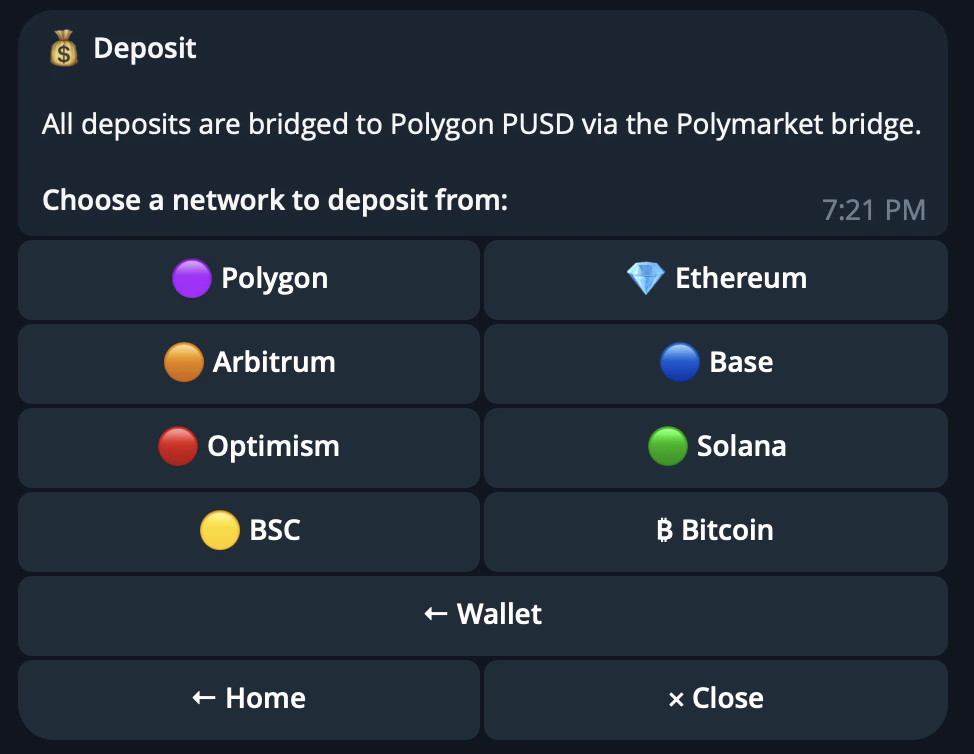
CRISP deposits are bridged into USDC.e on Polygon through the Polymarket bridge. This lets users fund their CRISP wallet from multiple supported chains while keeping the trading balance ready for Polymarket execution.

## How deposits work

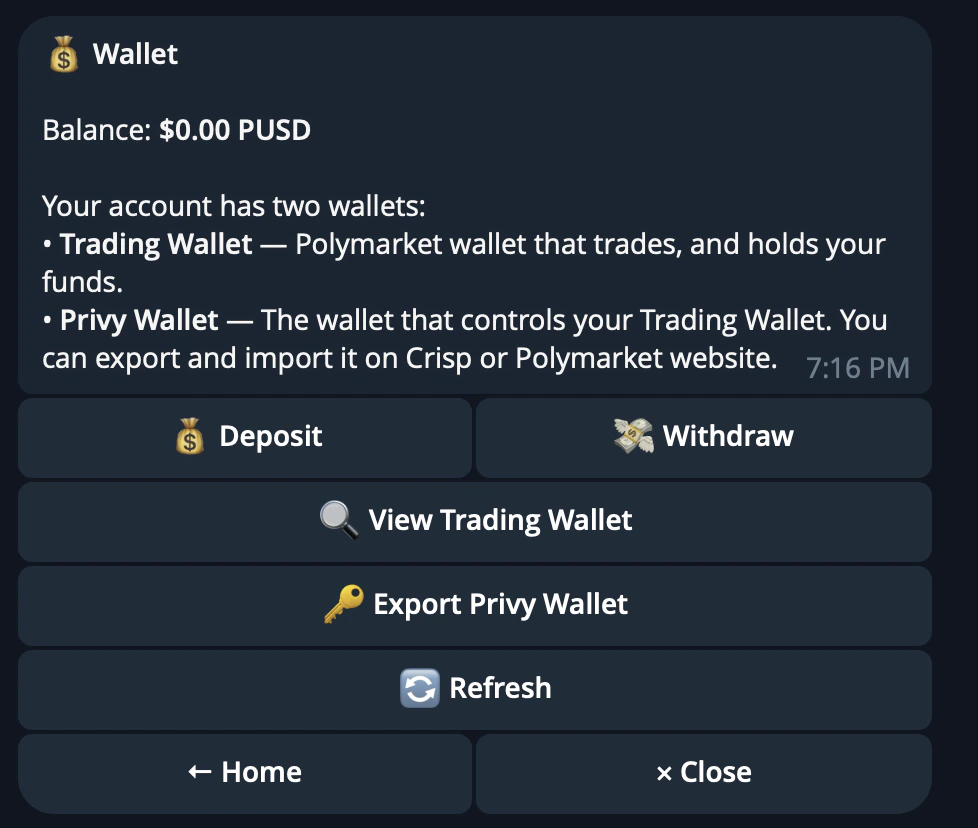
To start trading, you need funds in your CRISP wallet.

When you deposit, CRISP guides you through selecting a supported network and asset. The funds are then bridged into Polygon PUSD, which is the balance used for trading inside CRISP.

<div
  style={{
backgroundColor: "#0b1117",
backgroundImage:
  "linear-gradient(rgba(255,255,255,0.04) 1px, transparent 1px), linear-gradient(90deg, rgba(255,255,255,0.04) 1px, transparent 1px)",
backgroundSize: "40px 40px",
border: "1px solid rgba(255,255,255,0.08)",
borderRadius: "16px",
margin: "32px 0",
padding: "40px 32px",
display: "flex",
justifyContent: "center",
alignItems: "center",
minHeight: "360px",
}}
>
  <img
    src="https://mintcdn.com/crisp-4fe59a67/kz2jxfSUGJcFu5hx/images/telegrambot/deposit1_howdepositwork.png?fit=max&auto=format&n=kz2jxfSUGJcFu5hx&q=85&s=f425dfafe73d88bb12fdc1f008f745b7"
    alt="CRISP Telegram bot deposit flow showing supported assets and networks"
    style={{
  width: "min(560px, 100%)",
  borderRadius: "14px",
  boxShadow: "0 24px 60px rgba(0,0,0,0.45)",
}}
    width="978"
    height="828"
    data-path="images/telegrambot/deposit1_howdepositwork.png"
  />
</div>

Each network has a minimum deposit amount. The bot will show the required minimum before you send funds.

## Supported networks

CRISP supports deposits from several major networks, including Polygon, Ethereum, Arbitrum, Base, Optimism, Solana, BSC, and Bitcoin.

Supported assets vary by network. Common supported assets include USDC, USDT, ETH, DAI, WBTC, SOL, BNB, and BTC.

<div
  style={{
backgroundColor: "#0b1117",
backgroundImage:
  "linear-gradient(rgba(255,255,255,0.04) 1px, transparent 1px), linear-gradient(90deg, rgba(255,255,255,0.04) 1px, transparent 1px)",
backgroundSize: "40px 40px",
border: "1px solid rgba(255,255,255,0.08)",
borderRadius: "16px",
margin: "32px 0",
padding: "40px 32px",
display: "flex",
justifyContent: "center",
alignItems: "center",
minHeight: "360px",
}}
>
  <img
    src="https://mintcdn.com/crisp-4fe59a67/kz2jxfSUGJcFu5hx/images/telegrambot/deposit2_supportednetwork.png?fit=max&auto=format&n=kz2jxfSUGJcFu5hx&q=85&s=4c6c7a67993b75a6e3f9a06641382104"
    alt="CRISP Telegram bot supported deposit networks and assets"
    style={{
  width: "min(560px, 100%)",
  borderRadius: "14px",
  boxShadow: "0 24px 60px rgba(0,0,0,0.45)",
}}
    width="974"
    height="754"
    data-path="images/telegrambot/deposit2_supportednetwork.png"
  />
</div>

Always check the asset and network shown in the bot before sending funds.

## Important safety notes

<Warning>
  Only send supported assets on supported networks.

  Deposits below the minimum amount may not be processed. Sending unsupported tokens or using the wrong network can result in permanent loss of funds.
</Warning>

If you sent funds to the wrong address or need help with a deposit, contact the CRISP support group.

## Withdrawal

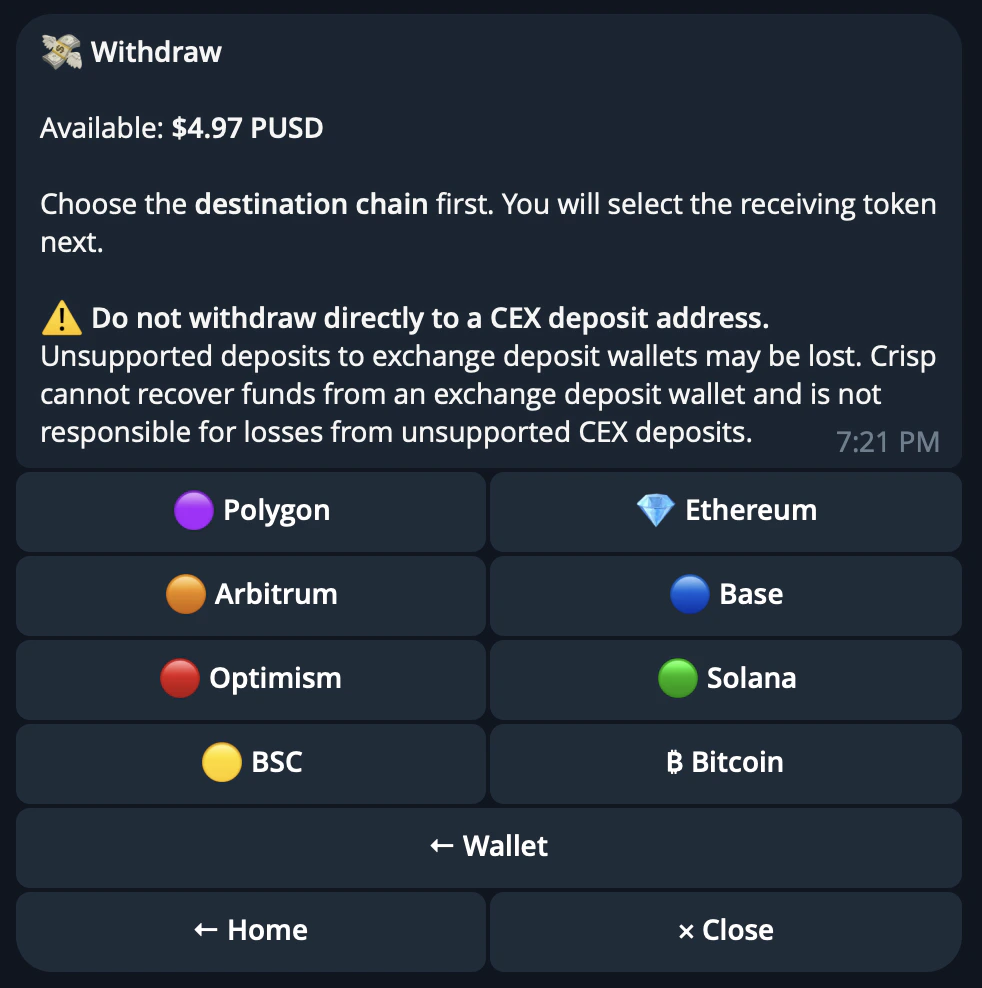
Withdrawal lets you move funds out of your CRISP wallet to a supported chain.

You can withdraw USDC and multiple tokens from your CRISP wallet at any time. The withdrawal flow is handled through the CRISP bot and lets you choose the destination chain, address, and withdrawal amount.

## How withdrawals work

Open `/wallets` in the CRISP Telegram bot.

From there, choose the wallet or balance you want to withdraw from, select the destination chain, and enter the address where you want the funds sent.

<div
  style={{
backgroundColor: "#0b1117",
backgroundImage:
  "linear-gradient(rgba(255,255,255,0.04) 1px, transparent 1px), linear-gradient(90deg, rgba(255,255,255,0.04) 1px, transparent 1px)",
backgroundSize: "40px 40px",
border: "1px solid rgba(255,255,255,0.08)",
borderRadius: "16px",
margin: "32px 0",
padding: "40px 32px",
display: "flex",
justifyContent: "center",
alignItems: "center",
minHeight: "400px",
}}
>
  <img
    src="https://mintcdn.com/crisp-4fe59a67/kz2jxfSUGJcFu5hx/images/telegrambot/withdraw1_destinationchain.png?fit=max&auto=format&n=kz2jxfSUGJcFu5hx&q=85&s=0b5d1f9f7d9c44e6d143cdf35fe64b29"
    alt="CRISP Telegram bot withdrawal flow showing destination chain selection"
    style={{
  width: "min(520px, 100%)",
  borderRadius: "14px",
  boxShadow: "0 24px 60px rgba(0,0,0,0.45)",
}}
    width="982"
    height="988"
    data-path="images/telegrambot/withdraw1_destinationchain.png"
  />
</div>

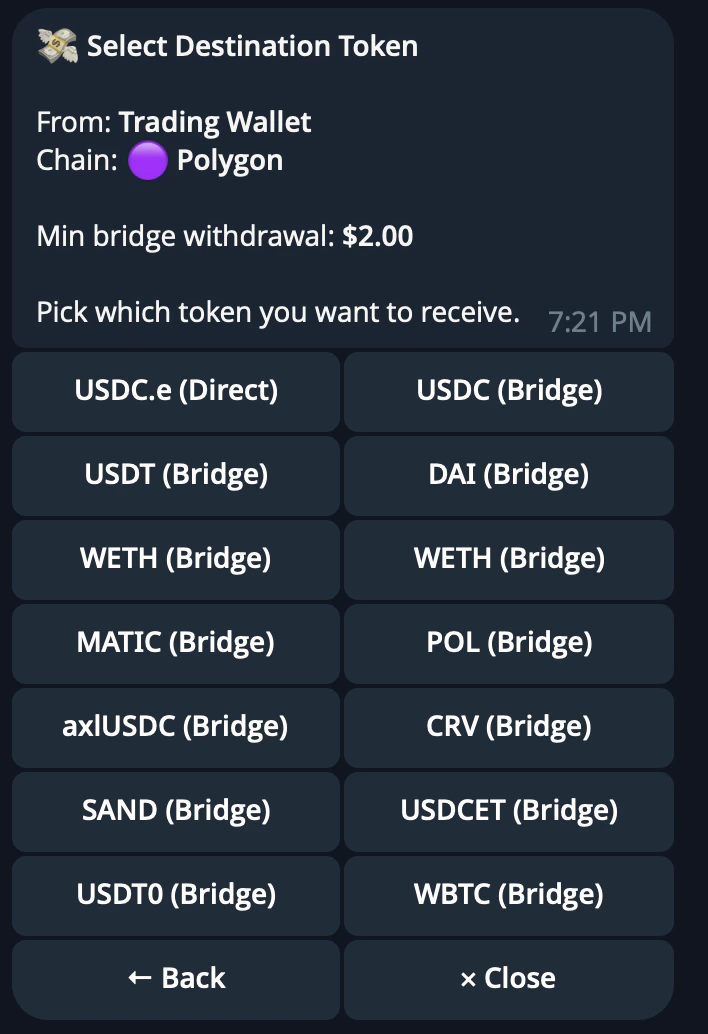
After choosing a chain, select the token you want to withdraw.

<div
  style={{
backgroundColor: "#0b1117",
backgroundImage:
  "linear-gradient(rgba(255,255,255,0.04) 1px, transparent 1px), linear-gradient(90deg, rgba(255,255,255,0.04) 1px, transparent 1px)",
backgroundSize: "40px 40px",
border: "1px solid rgba(255,255,255,0.08)",
borderRadius: "16px",
margin: "32px 0",
padding: "40px 32px",
display: "flex",
justifyContent: "center",
alignItems: "center",
minHeight: "440px",
}}
>
  <img
    src="https://mintcdn.com/crisp-4fe59a67/kz2jxfSUGJcFu5hx/images/telegrambot/withdraw2_destinationtoken.png?fit=max&auto=format&n=kz2jxfSUGJcFu5hx&q=85&s=c6a718ed3d393ee57fac1ee3c9253855"
    alt="CRISP Telegram bot withdrawal flow showing destination token selection"
    style={{
  width: "min(360px, 100%)",
  borderRadius: "14px",
  boxShadow: "0 24px 60px rgba(0,0,0,0.45)",
}}
    width="708"
    height="1034"
    data-path="images/telegrambot/withdraw2_destinationtoken.png"
  />
</div>

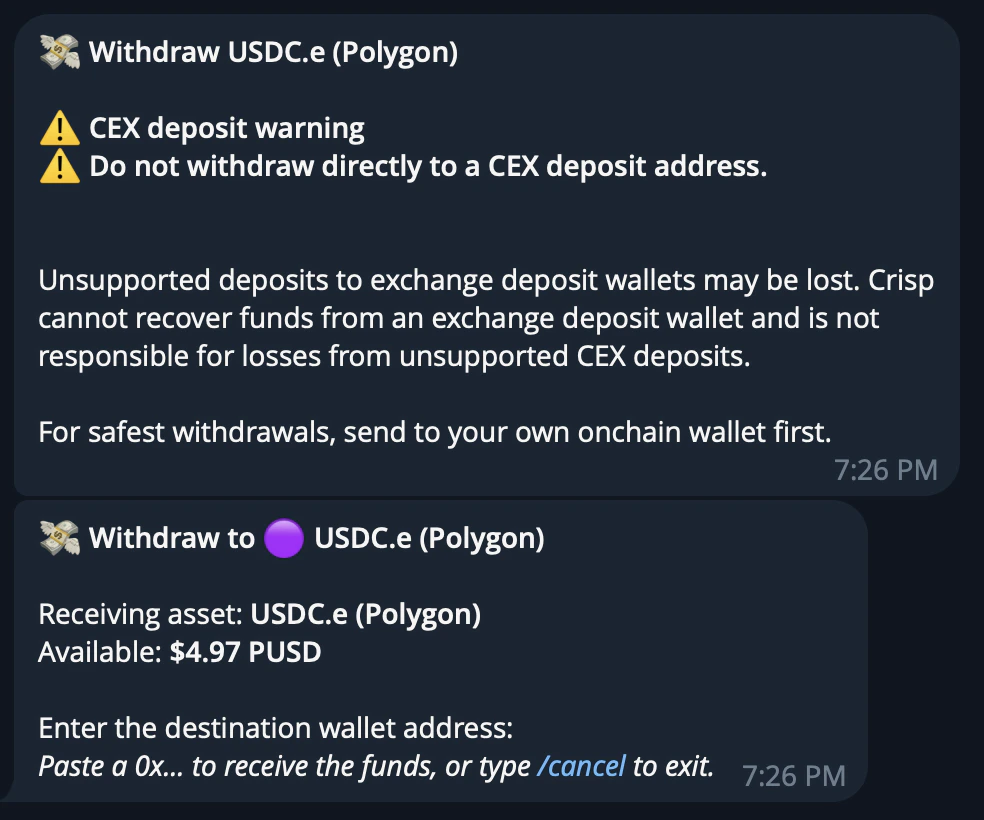
## Destination address

Enter the wallet address you want to withdraw to.

Make sure the address matches the chain you selected. For example, do not enter a Solana address when withdrawing to Ethereum. Sending funds to the wrong address or incompatible chain can result in permanent loss of funds.

<div
  style={{
backgroundColor: "#0b1117",
backgroundImage:
  "linear-gradient(rgba(255,255,255,0.04) 1px, transparent 1px), linear-gradient(90deg, rgba(255,255,255,0.04) 1px, transparent 1px)",
backgroundSize: "40px 40px",
border: "1px solid rgba(255,255,255,0.08)",
borderRadius: "16px",
margin: "32px 0",
padding: "40px 32px",
display: "flex",
justifyContent: "center",
alignItems: "center",
minHeight: "360px",
}}
>
  <img
    src="https://mintcdn.com/crisp-4fe59a67/kz2jxfSUGJcFu5hx/images/telegrambot/withdraw3_destinationaddress.png?fit=max&auto=format&n=kz2jxfSUGJcFu5hx&q=85&s=2c378ec578042638d819112a587c8095"
    alt="CRISP Telegram bot withdrawal flow showing destination address entry"
    style={{
  width: "min(560px, 100%)",
  borderRadius: "14px",
  boxShadow: "0 24px 60px rgba(0,0,0,0.45)",
}}
    width="984"
    height="820"
    data-path="images/telegrambot/withdraw3_destinationaddress.png"
  />
</div>

## Withdrawal amount

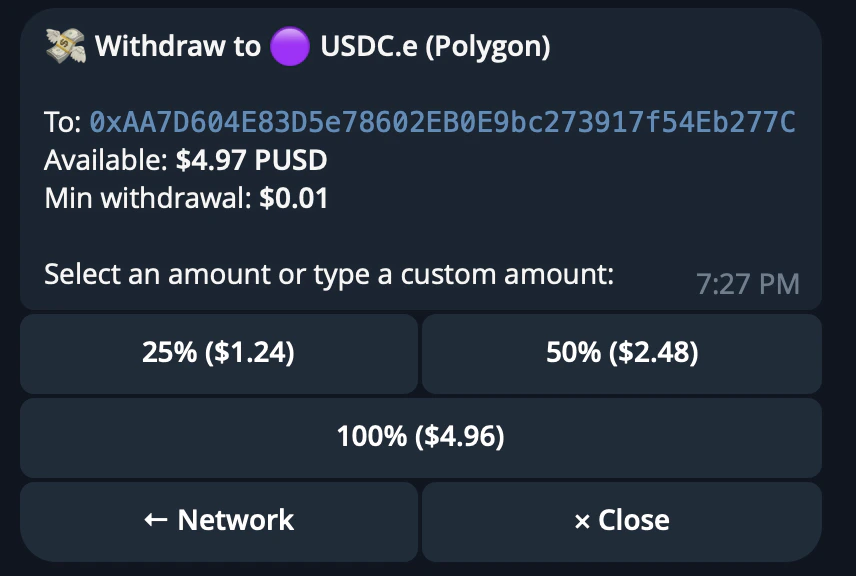
Choose how much you want to withdraw.

You can select one of the preset percentage amounts based on your CRISP wallet balance, or enter a custom amount manually.

Each chain has a minimum withdrawal amount. The bot will show the minimum when you select the chain.

<div
  style={{
backgroundColor: "#0b1117",
backgroundImage:
  "linear-gradient(rgba(255,255,255,0.04) 1px, transparent 1px), linear-gradient(90deg, rgba(255,255,255,0.04) 1px, transparent 1px)",
backgroundSize: "40px 40px",
border: "1px solid rgba(255,255,255,0.08)",
borderRadius: "16px",
margin: "32px 0",
padding: "40px 32px",
display: "flex",
justifyContent: "center",
alignItems: "center",
minHeight: "320px",
}}
>
  <img
    src="https://mintcdn.com/crisp-4fe59a67/kz2jxfSUGJcFu5hx/images/telegrambot/withdraw4_amount.png?fit=max&auto=format&n=kz2jxfSUGJcFu5hx&q=85&s=d5cab05282c2e6aa29063a112666d03f"
    alt="CRISP Telegram bot withdrawal flow showing withdrawal amount selection"
    style={{
  width: "min(520px, 100%)",
  borderRadius: "14px",
  boxShadow: "0 24px 60px rgba(0,0,0,0.45)",
}}
    width="856"
    height="576"
    data-path="images/telegrambot/withdraw4_amount.png"
  />
</div>

## Processing

After confirming the withdrawal, wait for the transaction to process.

Processing time can vary depending on the destination chain and bridge conditions.

## Trader Profile Analysis

Trader Profile Analysis gives you a complete intelligence breakdown of any Polymarket wallet.

Instead of manually checking a trader's history, positions, categories, and wallet behavior, CRISP pulls the key data into one profile so you can decide whether a trader is worth following, backtesting, or copytrading.

## How trader analysis works

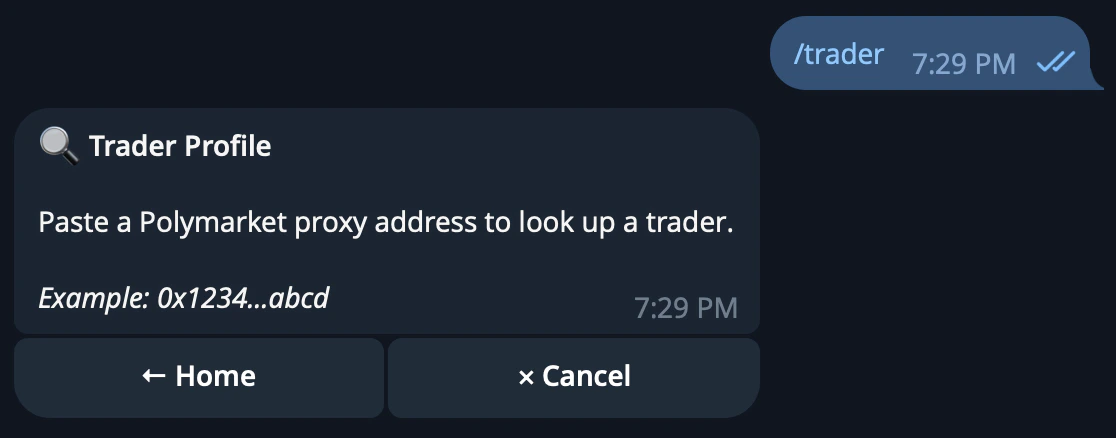
Paste any wallet address or ENS into CRISP.

<div
  style={{
backgroundColor: "#0b1117",
backgroundImage:
  "linear-gradient(rgba(255,255,255,0.04) 1px, transparent 1px), linear-gradient(90deg, rgba(255,255,255,0.04) 1px, transparent 1px)",
backgroundSize: "40px 40px",
border: "1px solid rgba(255,255,255,0.08)",
borderRadius: "16px",
margin: "32px 0",
padding: "40px 32px",
display: "flex",
justifyContent: "center",
alignItems: "center",
minHeight: "380px",
}}
>
  <img
    src="https://mintcdn.com/crisp-4fe59a67/kz2jxfSUGJcFu5hx/images/telegrambot/howtraderanalysisworks.png?fit=max&auto=format&n=kz2jxfSUGJcFu5hx&q=85&s=bc4f0e74a06700b5007001170f4ed603"
    alt="CRISP Telegram bot trader analysis wallet input flow"
    style={{
  width: "min(540px, 100%)",
  borderRadius: "14px",
  boxShadow: "0 24px 60px rgba(0,0,0,0.45)",
}}
    width="962"
    height="876"
    data-path="images/telegrambot/howtraderanalysisworks.png"
  />
</div>

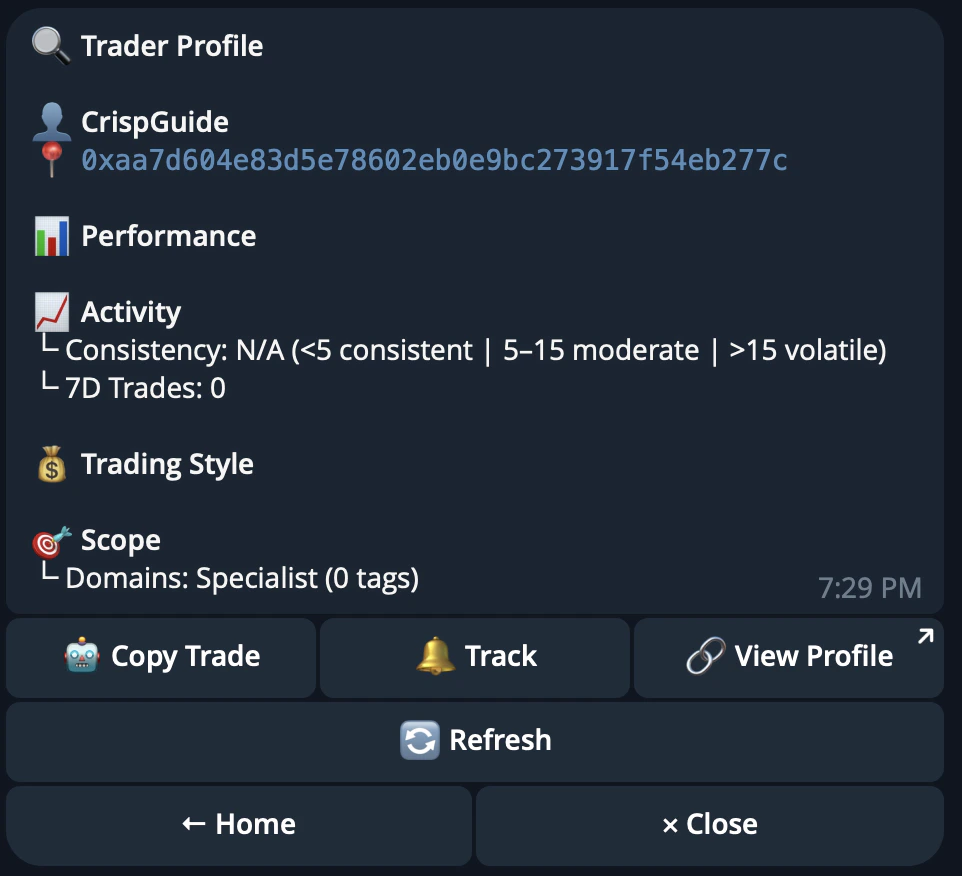
CRISP analyzes the wallet and returns a profile showing trading history, win rate, P\&L, position sizing, category exposure, hold time, and other performance signals.

<div
  style={{
backgroundColor: "#0b1117",
backgroundImage:
  "linear-gradient(rgba(255,255,255,0.04) 1px, transparent 1px), linear-gradient(90deg, rgba(255,255,255,0.04) 1px, transparent 1px)",
backgroundSize: "40px 40px",
border: "1px solid rgba(255,255,255,0.08)",
borderRadius: "16px",
margin: "32px 0",
padding: "40px 32px",
display: "flex",
justifyContent: "center",
alignItems: "center",
minHeight: "320px",
}}
>
  <img
    src="https://mintcdn.com/crisp-4fe59a67/kz2jxfSUGJcFu5hx/images/telegrambot/trader_profileanalysis.png?fit=max&auto=format&n=kz2jxfSUGJcFu5hx&q=85&s=6469048dee845c2a4653b78240e6f3e4"
    alt="CRISP Telegram bot trader profile analysis result"
    style={{
  width: "min(640px, 100%)",
  borderRadius: "14px",
  boxShadow: "0 24px 60px rgba(0,0,0,0.45)",
}}
    width="1116"
    height="438"
    data-path="images/telegrambot/trader_profileanalysis.png"
  />
</div>

This helps users understand not only whether a wallet is profitable, but how that wallet is making money.

## Insider Activity Detection

CRISP also looks for unusual wallet behavior.

This includes large positions taken before public catalysts, wallets that repeatedly move before the market reacts, and possible coordinated activity across multiple addresses.

The goal is to help users spot wallets that may have a real informational edge.

## Top Traders Ranking

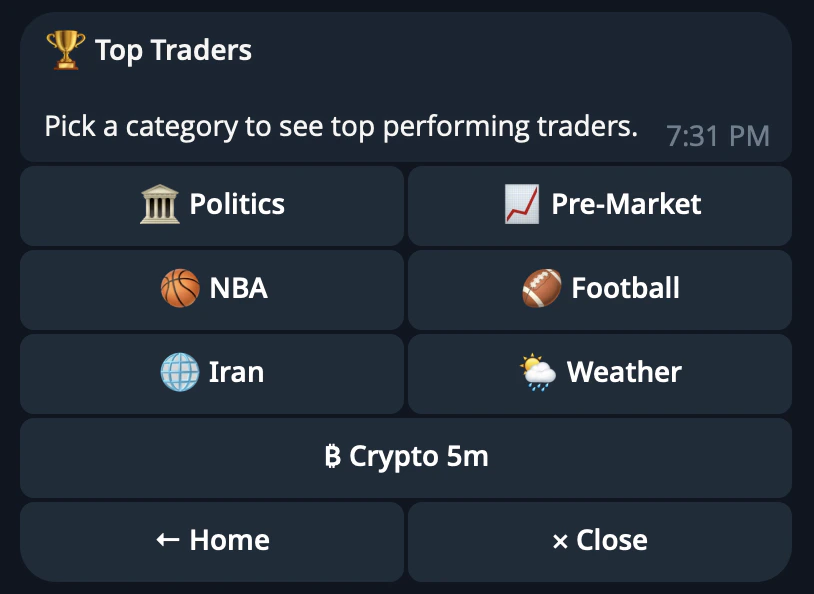
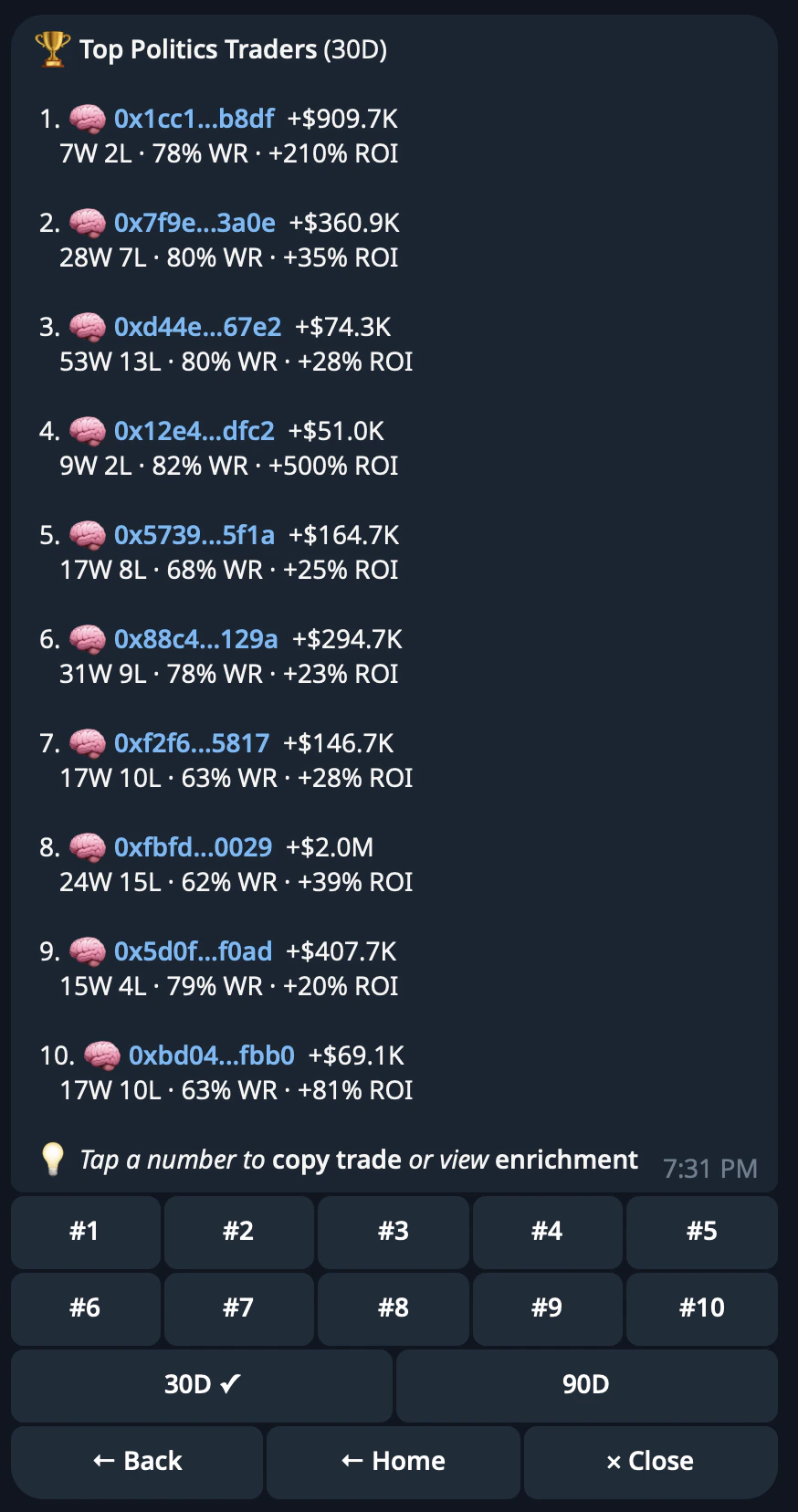
CRISP ranks top-performing wallets by category, time period, and performance metrics.

Use the leaderboard to discover traders worth studying, following, or copying.

<div
  style={{
backgroundColor: "#0b1117",
backgroundImage:
  "linear-gradient(rgba(255,255,255,0.04) 1px, transparent 1px), linear-gradient(90deg, rgba(255,255,255,0.04) 1px, transparent 1px)",
backgroundSize: "40px 40px",
border: "1px solid rgba(255,255,255,0.08)",
borderRadius: "16px",
margin: "32px 0",
padding: "40px 32px",
display: "flex",
justifyContent: "center",
alignItems: "center",
minHeight: "360px",
}}
>
  <img
    src="https://mintcdn.com/crisp-4fe59a67/kz2jxfSUGJcFu5hx/images/telegrambot/toptraderranking.png?fit=max&auto=format&n=kz2jxfSUGJcFu5hx&q=85&s=df07d1b12ddf65d752c44eb1b00193aa"
    alt="CRISP Telegram bot top traders category selection"
    style={{
  width: "min(520px, 100%)",
  borderRadius: "14px",
  boxShadow: "0 24px 60px rgba(0,0,0,0.45)",
}}
    width="814"
    height="594"
    data-path="images/telegrambot/toptraderranking.png"
  />
</div>

<div
  style={{
backgroundColor: "#0b1117",
backgroundImage:
  "linear-gradient(rgba(255,255,255,0.04) 1px, transparent 1px), linear-gradient(90deg, rgba(255,255,255,0.04) 1px, transparent 1px)",
backgroundSize: "40px 40px",
border: "1px solid rgba(255,255,255,0.08)",
borderRadius: "16px",
margin: "32px 0",
padding: "40px 32px",
display: "flex",
justifyContent: "center",
alignItems: "center",
minHeight: "520px",
}}
>
  <img
    src="https://mintcdn.com/crisp-4fe59a67/kz2jxfSUGJcFu5hx/images/telegrambot/toptraderranking2.png?fit=max&auto=format&n=kz2jxfSUGJcFu5hx&q=85&s=7795abb58dd2de31d45d9ead2dbedd46"
    alt="CRISP Telegram bot top traders ranking list"
    style={{
  width: "min(360px, 100%)",
  borderRadius: "14px",
  boxShadow: "0 24px 60px rgba(0,0,0,0.45)",
}}
    width="874"
    height="1656"
    data-path="images/telegrambot/toptraderranking2.png"
  />
</div>

## Copy Trading

Copy Trading lets you automatically mirror trades from selected Polymarket wallets.

Instead of manually watching a trader and copying each position yourself, CRISP can follow the wallet for you and execute matching trades based on the rules you set.

## How Copy Trading Works

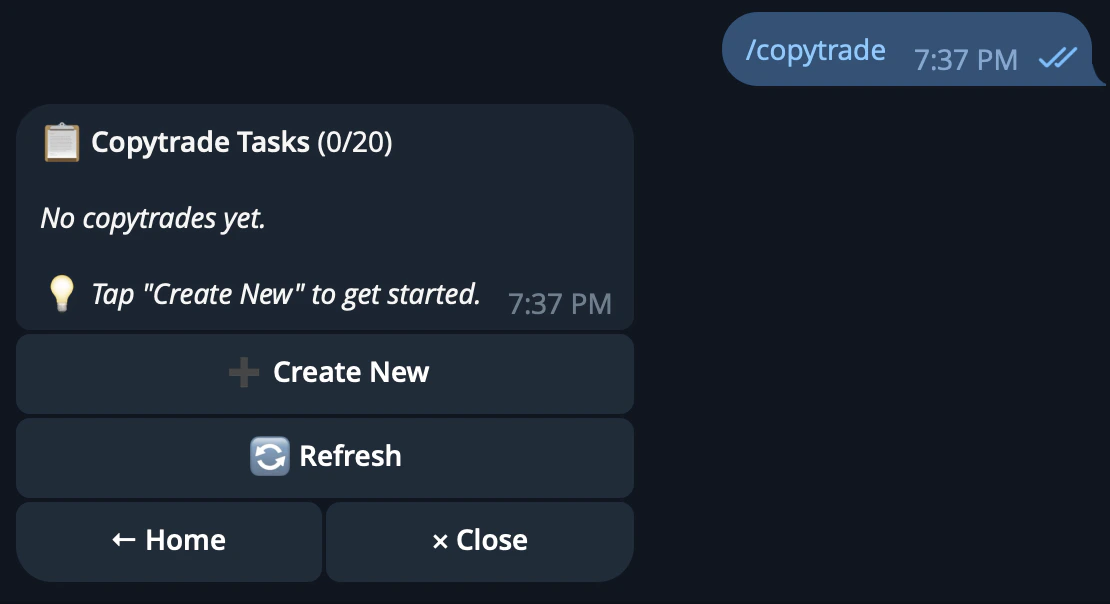
Open the CRISP Telegram bot and tap Copytrade, or send `/copytrade`.

<div
  style={{
backgroundColor: "#0b1117",
backgroundImage:
  "linear-gradient(rgba(255,255,255,0.04) 1px, transparent 1px), linear-gradient(90deg, rgba(255,255,255,0.04) 1px, transparent 1px)",
backgroundSize: "40px 40px",
border: "1px solid rgba(255,255,255,0.08)",
borderRadius: "16px",
margin: "32px 0",
padding: "40px 32px",
display: "flex",
justifyContent: "center",
alignItems: "center",
minHeight: "360px",
}}
>
  <img
    src="https://mintcdn.com/crisp-4fe59a67/kz2jxfSUGJcFu5hx/images/telegrambot/copytrading_howcopytradingworks.png?fit=max&auto=format&n=kz2jxfSUGJcFu5hx&q=85&s=e1bee710e9b498edd45701adb4b5587b"
    alt="CRISP Telegram bot copy trading setup entry point"
    style={{
  width: "min(640px, 100%)",
  borderRadius: "14px",
  boxShadow: "0 24px 60px rgba(0,0,0,0.45)",
}}
    width="1110"
    height="604"
    data-path="images/telegrambot/copytrading_howcopytradingworks.png"
  />
</div>

From there, enter the wallet address you want to copy, name the task, choose your sizing method, configure filters, and confirm.

Once active, the task starts mirroring trades automatically.

## Enter a wallet to copy

Paste the `0x` wallet address of the trader you want to follow.

You can use `/top_traders` to find high-performing wallets, or `/trader` to analyze a wallet before copying it.

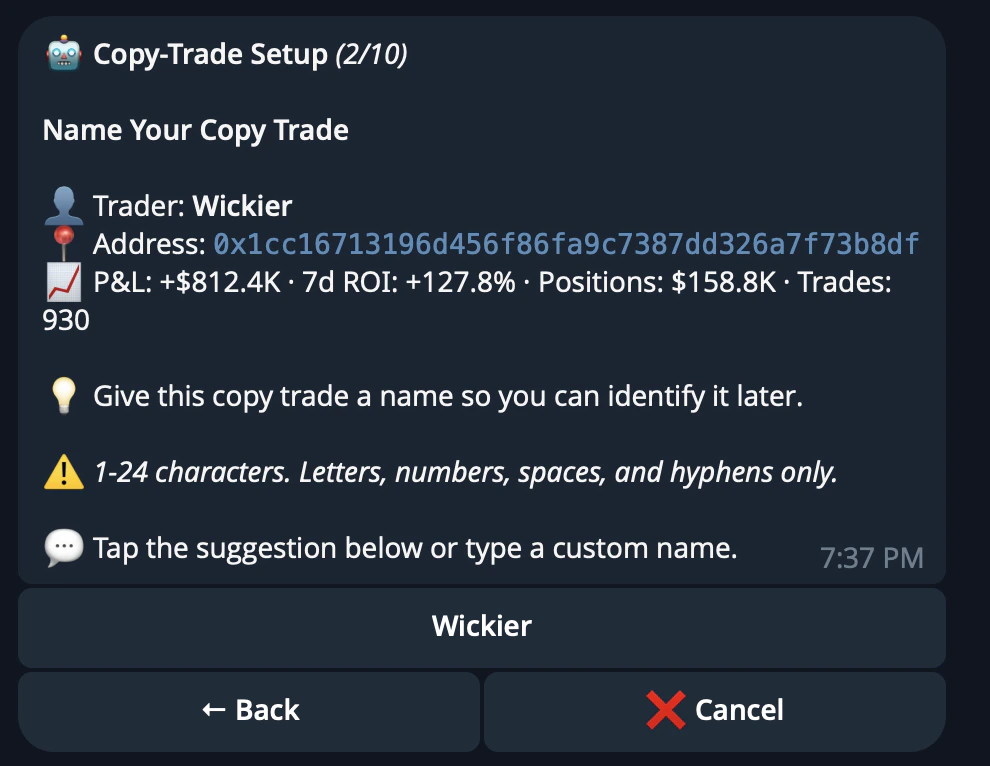
## Name Your Task

Give the copytrade task a short label.

<div
  style={{
backgroundColor: "#0b1117",
backgroundImage:
  "linear-gradient(rgba(255,255,255,0.04) 1px, transparent 1px), linear-gradient(90deg, rgba(255,255,255,0.04) 1px, transparent 1px)",
backgroundSize: "40px 40px",
border: "1px solid rgba(255,255,255,0.08)",
borderRadius: "16px",
margin: "32px 0",
padding: "40px 32px",
display: "flex",
justifyContent: "center",
alignItems: "center",
minHeight: "360px",
}}
>
  <img
    src="https://mintcdn.com/crisp-4fe59a67/kz2jxfSUGJcFu5hx/images/telegrambot/nameyourtask.png?fit=max&auto=format&n=kz2jxfSUGJcFu5hx&q=85&s=f866b98a2c474b54bdf25b1335c9dd49"
    alt="CRISP Telegram bot copytrade task naming step"
    style={{
  width: "min(560px, 100%)",
  borderRadius: "14px",
  boxShadow: "0 24px 60px rgba(0,0,0,0.45)",
}}
    width="990"
    height="766"
    data-path="images/telegrambot/nameyourtask.png"
  />
</div>

This makes it easier to identify later, especially if you are running multiple copy tasks at the same time.

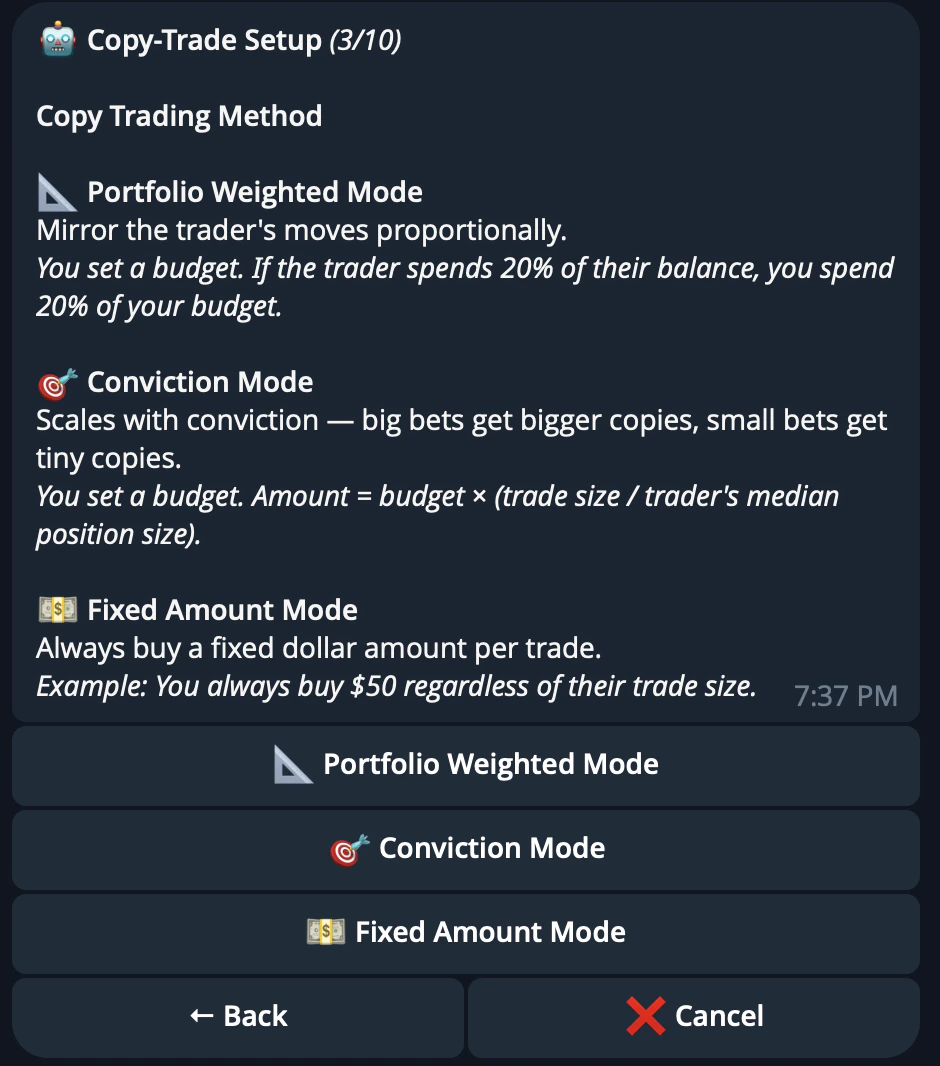
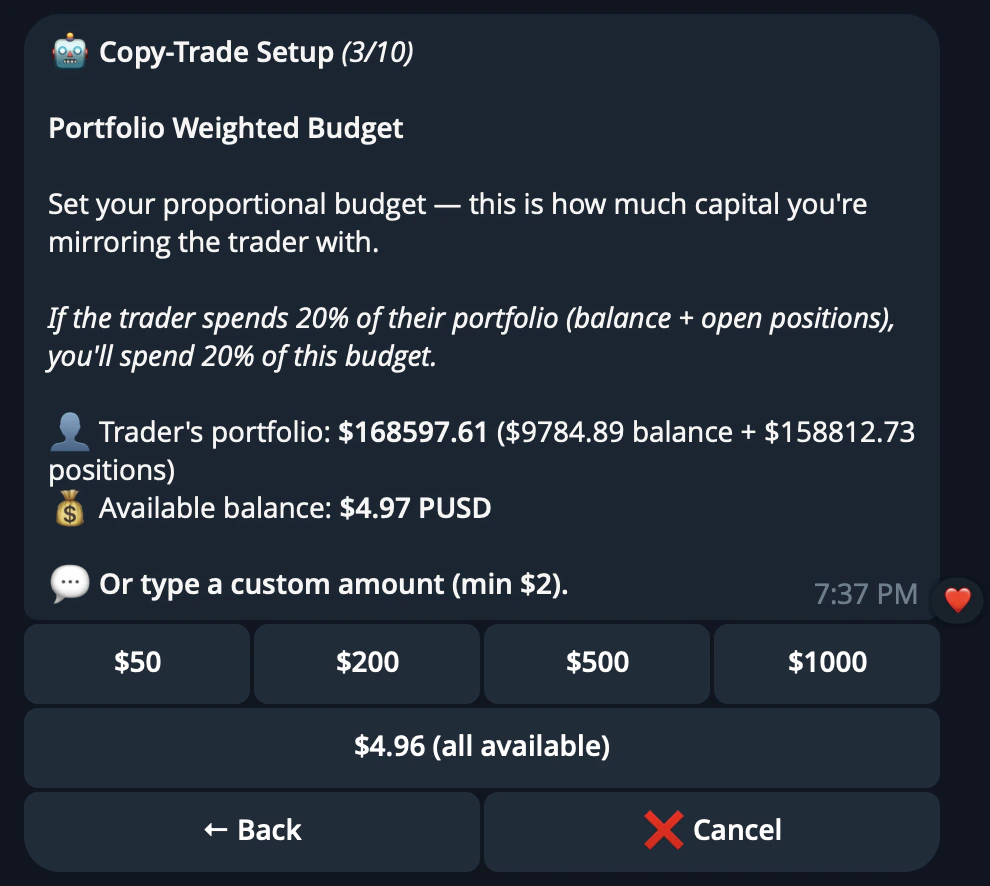
## Choose Your Sizing

Select how much CRISP should allocate to each copied trade.

<div
  style={{
backgroundColor: "#0b1117",
backgroundImage:
  "linear-gradient(rgba(255,255,255,0.04) 1px, transparent 1px), linear-gradient(90deg, rgba(255,255,255,0.04) 1px, transparent 1px)",
backgroundSize: "40px 40px",
border: "1px solid rgba(255,255,255,0.08)",
borderRadius: "16px",
margin: "32px 0",
padding: "40px 32px",
display: "flex",
justifyContent: "center",
alignItems: "center",
minHeight: "400px",
}}
>
  <img
    src="https://mintcdn.com/crisp-4fe59a67/kz2jxfSUGJcFu5hx/images/telegrambot/chooseyoursizing.png?fit=max&auto=format&n=kz2jxfSUGJcFu5hx&q=85&s=ae133cd3eca563c6bcca9a214cde6f93"
    alt="CRISP Telegram bot copytrade sizing selection"
    style={{
  width: "min(500px, 100%)",
  borderRadius: "14px",
  boxShadow: "0 24px 60px rgba(0,0,0,0.45)",
}}
    width="940"
    height="1066"
    data-path="images/telegrambot/chooseyoursizing.png"
  />
</div>

| Mode            | Description                                                                            |
| --------------- | -------------------------------------------------------------------------------------- |
| Fixed Mode      | Uses the same dollar amount for each copied trade                                      |
| Percentage Mode | Sizes copied trades as a percentage of your available balance or configured allocation |

The minimum trade size is **USD 2**.

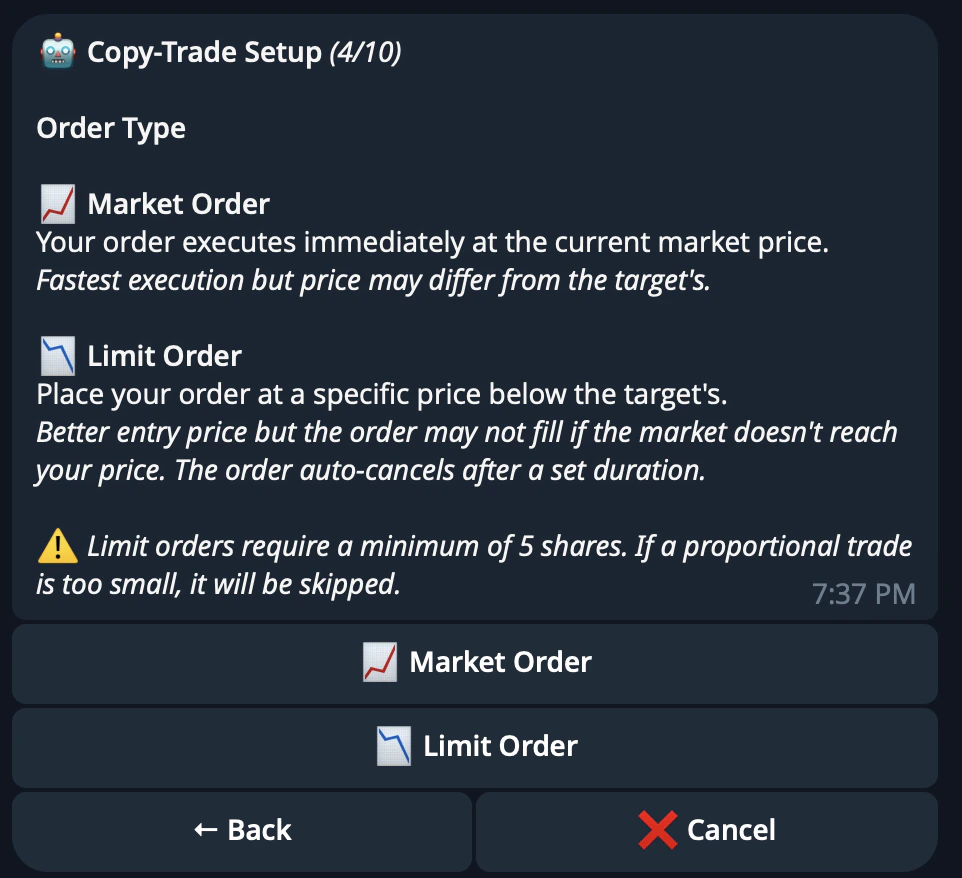
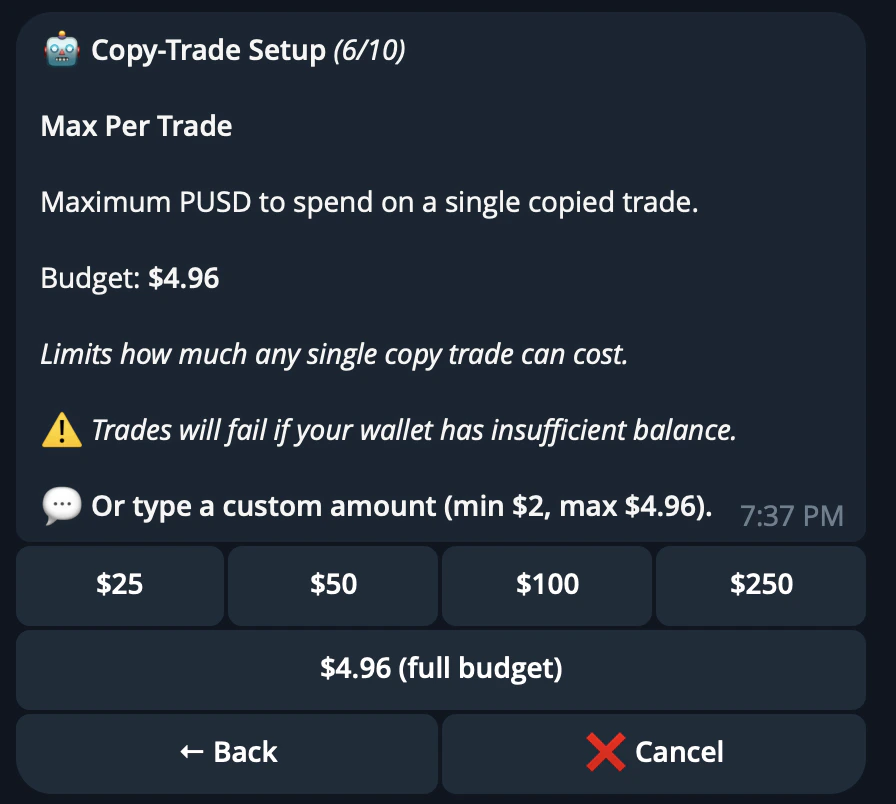
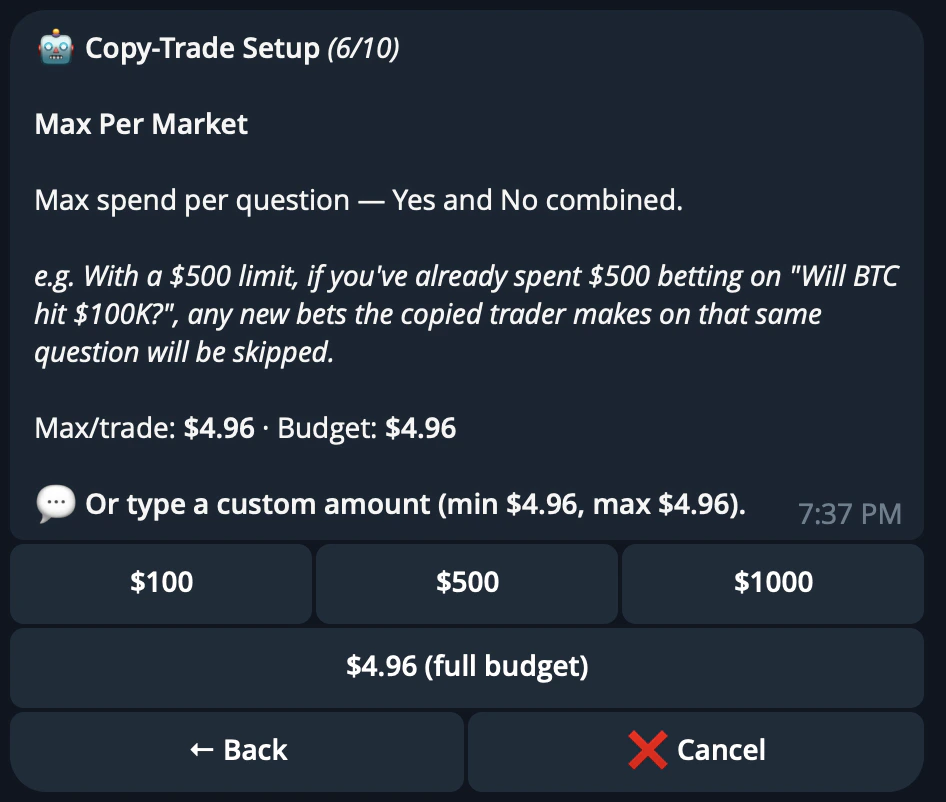
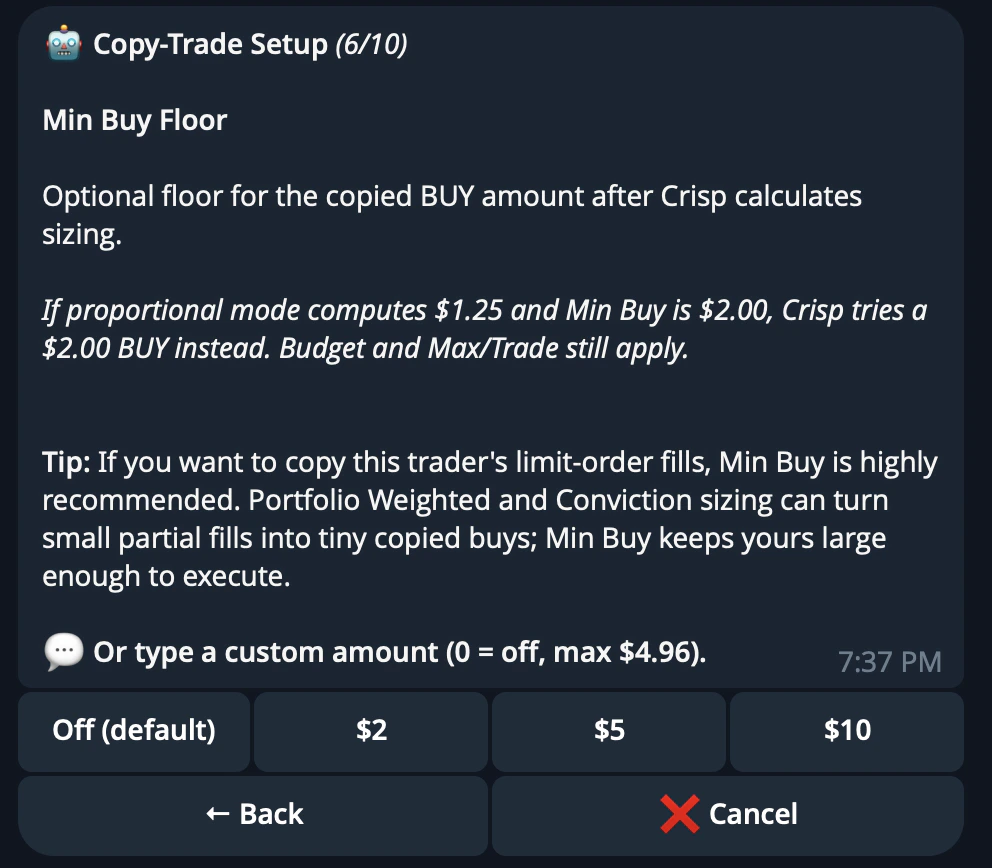
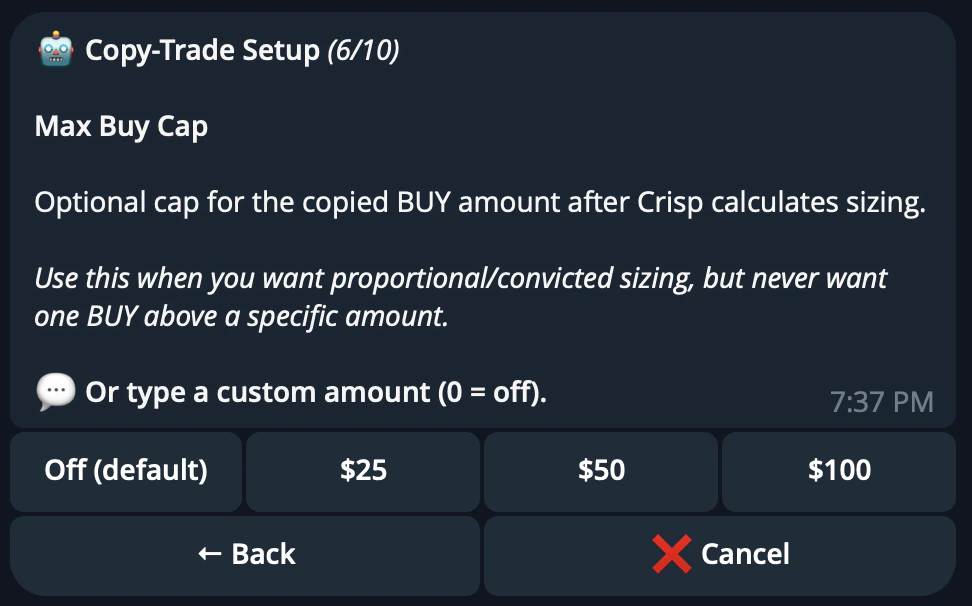
## Configure Filter

Set the rules CRISP should follow before copying a trade.

<div
  style={{
backgroundColor: "#0b1117",
backgroundImage:
  "linear-gradient(rgba(255,255,255,0.04) 1px, transparent 1px), linear-gradient(90deg, rgba(255,255,255,0.04) 1px, transparent 1px)",
backgroundSize: "40px 40px",
border: "1px solid rgba(255,255,255,0.08)",
borderRadius: "16px",
margin: "32px 0",
padding: "40px 32px",
display: "flex",
justifyContent: "center",
alignItems: "center",
minHeight: "380px",
}}
>
  <img
    src="https://mintcdn.com/crisp-4fe59a67/kz2jxfSUGJcFu5hx/images/telegrambot/configurefilter1.png?fit=max&auto=format&n=kz2jxfSUGJcFu5hx&q=85&s=774e6ef89997ae9f92895dbd097fd7ee"
    alt="CRISP Telegram bot copytrade filter configuration"
    style={{
  width: "min(560px, 100%)",
  borderRadius: "14px",
  boxShadow: "0 24px 60px rgba(0,0,0,0.45)",
}}
    width="990"
    height="886"
    data-path="images/telegrambot/configurefilter1.png"
  />
</div>

<div
  style={{
backgroundColor: "#0b1117",
backgroundImage:
  "linear-gradient(rgba(255,255,255,0.04) 1px, transparent 1px), linear-gradient(90deg, rgba(255,255,255,0.04) 1px, transparent 1px)",
backgroundSize: "40px 40px",
border: "1px solid rgba(255,255,255,0.08)",
borderRadius: "16px",
margin: "32px 0",
padding: "40px 32px",
display: "flex",
justifyContent: "center",
alignItems: "center",
minHeight: "380px",
}}
>
  <img
    src="https://mintcdn.com/crisp-4fe59a67/kz2jxfSUGJcFu5hx/images/telegrambot/configurefilter2.png?fit=max&auto=format&n=kz2jxfSUGJcFu5hx&q=85&s=771adcd3ba6f1446068c988901478187"
    alt="CRISP Telegram bot copytrade filter confirmation"
    style={{
  width: "min(560px, 100%)",
  borderRadius: "14px",
  boxShadow: "0 24px 60px rgba(0,0,0,0.45)",
}}
    width="962"
    height="878"
    data-path="images/telegrambot/configurefilter2.png"
  />
</div>

<div
  style={{
backgroundColor: "#0b1117",
backgroundImage:
  "linear-gradient(rgba(255,255,255,0.04) 1px, transparent 1px), linear-gradient(90deg, rgba(255,255,255,0.04) 1px, transparent 1px)",
backgroundSize: "40px 40px",
border: "1px solid rgba(255,255,255,0.08)",
borderRadius: "16px",
margin: "32px 0",
padding: "40px 32px",
display: "flex",
justifyContent: "center",
alignItems: "center",
minHeight: "380px",
}}
>
  <img
    src="https://mintcdn.com/crisp-4fe59a67/Gx5OcnUze2EDFx4o/images/telegrambot/configurefilter3.png?fit=max&auto=format&n=Gx5OcnUze2EDFx4o&q=85&s=90122ea12010c75a14dbaf6f8264090f"
    alt="CRISP Telegram bot copytrade filter setup step"
    style={{
  width: "min(560px, 100%)",
  borderRadius: "14px",
  boxShadow: "0 24px 60px rgba(0,0,0,0.45)",
}}
    width="896"
    height="804"
    data-path="images/telegrambot/configurefilter3.png"
  />
</div>

<div
  style={{
backgroundColor: "#0b1117",
backgroundImage:
  "linear-gradient(rgba(255,255,255,0.04) 1px, transparent 1px), linear-gradient(90deg, rgba(255,255,255,0.04) 1px, transparent 1px)",
backgroundSize: "40px 40px",
border: "1px solid rgba(255,255,255,0.08)",
borderRadius: "16px",
margin: "32px 0",
padding: "40px 32px",
display: "flex",
justifyContent: "center",
alignItems: "center",
minHeight: "380px",
}}
>
  <img
    src="https://mintcdn.com/crisp-4fe59a67/Gx5OcnUze2EDFx4o/images/telegrambot/configurefilter4.png?fit=max&auto=format&n=Gx5OcnUze2EDFx4o&q=85&s=b07145a767cd9cd476bd58703d4d18a4"
    alt="CRISP Telegram bot copytrade filter setup step"
    style={{
  width: "min(560px, 100%)",
  borderRadius: "14px",
  boxShadow: "0 24px 60px rgba(0,0,0,0.45)",
}}
    width="946"
    height="802"
    data-path="images/telegrambot/configurefilter4.png"
  />
</div>

<div
  style={{
backgroundColor: "#0b1117",
backgroundImage:
  "linear-gradient(rgba(255,255,255,0.04) 1px, transparent 1px), linear-gradient(90deg, rgba(255,255,255,0.04) 1px, transparent 1px)",
backgroundSize: "40px 40px",
border: "1px solid rgba(255,255,255,0.08)",
borderRadius: "16px",
margin: "32px 0",
padding: "40px 32px",
display: "flex",
justifyContent: "center",
alignItems: "center",
minHeight: "380px",
}}
>
  <img
    src="https://mintcdn.com/crisp-4fe59a67/Gx5OcnUze2EDFx4o/images/telegrambot/configurefilter6.png?fit=max&auto=format&n=Gx5OcnUze2EDFx4o&q=85&s=80aca436a745dab8304441a8b059c5b6"
    alt="CRISP Telegram bot copytrade filter setup step"
    style={{
  width: "min(560px, 100%)",
  borderRadius: "14px",
  boxShadow: "0 24px 60px rgba(0,0,0,0.45)",
}}
    width="992"
    height="868"
    data-path="images/telegrambot/configurefilter6.png"
  />
</div>

<div
  style={{
backgroundColor: "#0b1117",
backgroundImage:
  "linear-gradient(rgba(255,255,255,0.04) 1px, transparent 1px), linear-gradient(90deg, rgba(255,255,255,0.04) 1px, transparent 1px)",
backgroundSize: "40px 40px",
border: "1px solid rgba(255,255,255,0.08)",
borderRadius: "16px",
margin: "32px 0",
padding: "40px 32px",
display: "flex",
justifyContent: "center",
alignItems: "center",
minHeight: "360px",
}}
>
  <img
    src="https://mintcdn.com/crisp-4fe59a67/Gx5OcnUze2EDFx4o/images/telegrambot/configurefilter7.png?fit=max&auto=format&n=Gx5OcnUze2EDFx4o&q=85&s=0d3aff51a0456d3bc7fa2c3b569d9166"
    alt="CRISP Telegram bot copytrade filter setup step"
    style={{
  width: "min(560px, 100%)",
  borderRadius: "14px",
  boxShadow: "0 24px 60px rgba(0,0,0,0.45)",
}}
    width="972"
    height="606"
    data-path="images/telegrambot/configurefilter7.png"
  />
</div>

<div
  style={{
backgroundColor: "#0b1117",
backgroundImage:
  "linear-gradient(rgba(255,255,255,0.04) 1px, transparent 1px), linear-gradient(90deg, rgba(255,255,255,0.04) 1px, transparent 1px)",
backgroundSize: "40px 40px",
border: "1px solid rgba(255,255,255,0.08)",
borderRadius: "16px",
margin: "32px 0",
padding: "40px 32px",
display: "flex",
justifyContent: "center",
alignItems: "center",
minHeight: "400px",
}}
>
  <img
    src="https://mintcdn.com/crisp-4fe59a67/Gx5OcnUze2EDFx4o/images/telegrambot/configurefilter8.png?fit=max&auto=format&n=Gx5OcnUze2EDFx4o&q=85&s=d34c0e2226cb4efdaf175a2349696eb1"
    alt="CRISP Telegram bot copytrade filter setup step"
    style={{
  width: "min(500px, 100%)",
  borderRadius: "14px",
  boxShadow: "0 24px 60px rgba(0,0,0,0.45)",
}}
    width="952"
    height="1068"
    data-path="images/telegrambot/configurefilter8.png"
  />
</div>

<div
  style={{
backgroundColor: "#0b1117",
backgroundImage:
  "linear-gradient(rgba(255,255,255,0.04) 1px, transparent 1px), linear-gradient(90deg, rgba(255,255,255,0.04) 1px, transparent 1px)",
backgroundSize: "40px 40px",
border: "1px solid rgba(255,255,255,0.08)",
borderRadius: "16px",
margin: "32px 0",
padding: "40px 32px",
display: "flex",
justifyContent: "center",
alignItems: "center",
minHeight: "380px",
}}
>
  <img
    src="https://mintcdn.com/crisp-4fe59a67/Gx5OcnUze2EDFx4o/images/telegrambot/configurefilter9.png?fit=max&auto=format&n=Gx5OcnUze2EDFx4o&q=85&s=cf41a33f3dcefc1992b94b4fbd6e8a53"
    alt="CRISP Telegram bot copytrade filter setup step"
    style={{
  width: "min(560px, 100%)",
  borderRadius: "14px",
  boxShadow: "0 24px 60px rgba(0,0,0,0.45)",
}}
    width="978"
    height="806"
    data-path="images/telegrambot/configurefilter9.png"
  />
</div>

<div
  style={{
backgroundColor: "#0b1117",
backgroundImage:
  "linear-gradient(rgba(255,255,255,0.04) 1px, transparent 1px), linear-gradient(90deg, rgba(255,255,255,0.04) 1px, transparent 1px)",
backgroundSize: "40px 40px",
border: "1px solid rgba(255,255,255,0.08)",
borderRadius: "16px",
margin: "32px 0",
padding: "40px 32px",
display: "flex",
justifyContent: "center",
alignItems: "center",
minHeight: "520px",
}}
>
  <img
    src="https://mintcdn.com/crisp-4fe59a67/Gx5OcnUze2EDFx4o/images/telegrambot/configurefilter10.png?fit=max&auto=format&n=Gx5OcnUze2EDFx4o&q=85&s=f66ac2e84b6a95537958b049c297ac23"
    alt="CRISP Telegram bot copytrade filter setup step"
    style={{
  width: "min(380px, 100%)",
  borderRadius: "14px",
  boxShadow: "0 24px 60px rgba(0,0,0,0.45)",
}}
    width="982"
    height="1538"
    data-path="images/telegrambot/configurefilter10.png"
  />
</div>

<div
  style={{
backgroundColor: "#0b1117",
backgroundImage:
  "linear-gradient(rgba(255,255,255,0.04) 1px, transparent 1px), linear-gradient(90deg, rgba(255,255,255,0.04) 1px, transparent 1px)",
backgroundSize: "40px 40px",
border: "1px solid rgba(255,255,255,0.08)",
borderRadius: "16px",
margin: "32px 0",
padding: "40px 32px",
display: "flex",
justifyContent: "center",
alignItems: "center",
minHeight: "360px",
}}
>
  <img
    src="https://mintcdn.com/crisp-4fe59a67/Gx5OcnUze2EDFx4o/images/telegrambot/configurefilter11.png?fit=max&auto=format&n=Gx5OcnUze2EDFx4o&q=85&s=69c82eb3dd9a354913f121f08e6682f8"
    alt="CRISP Telegram bot copytrade filter setup step"
    style={{
  width: "min(520px, 100%)",
  borderRadius: "14px",
  boxShadow: "0 24px 60px rgba(0,0,0,0.45)",
}}
    width="808"
    height="658"
    data-path="images/telegrambot/configurefilter11.png"
  />
</div>

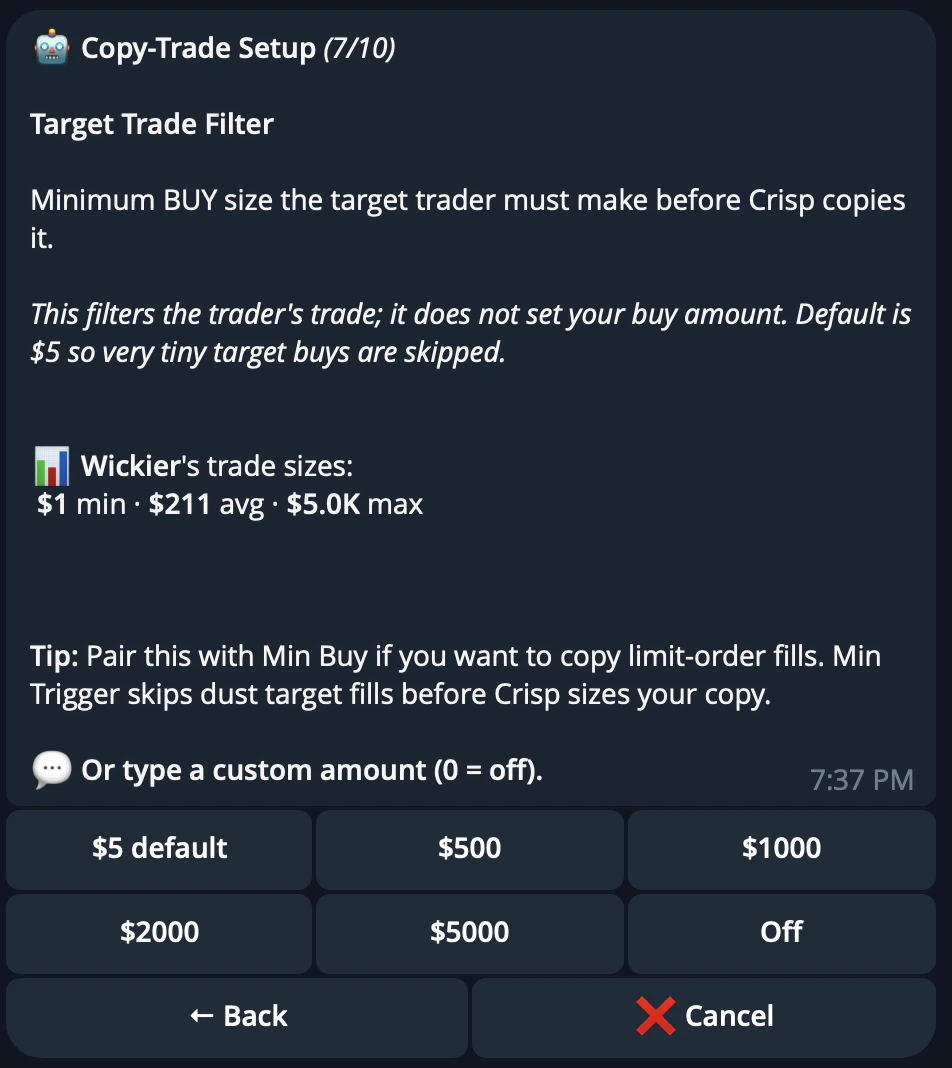
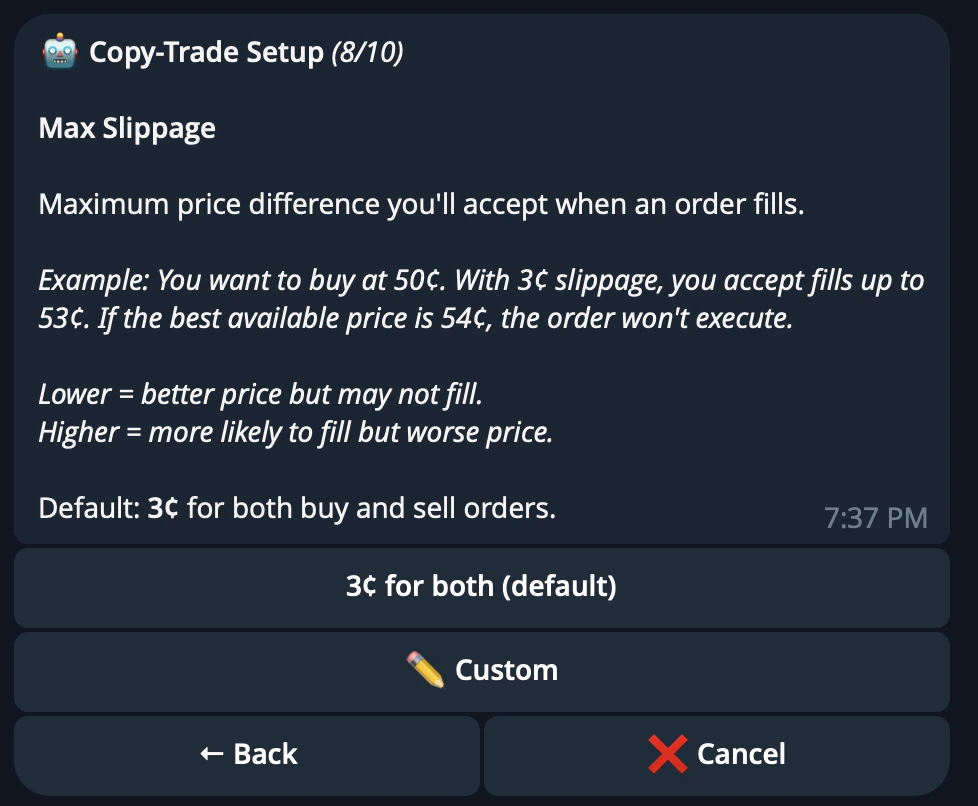
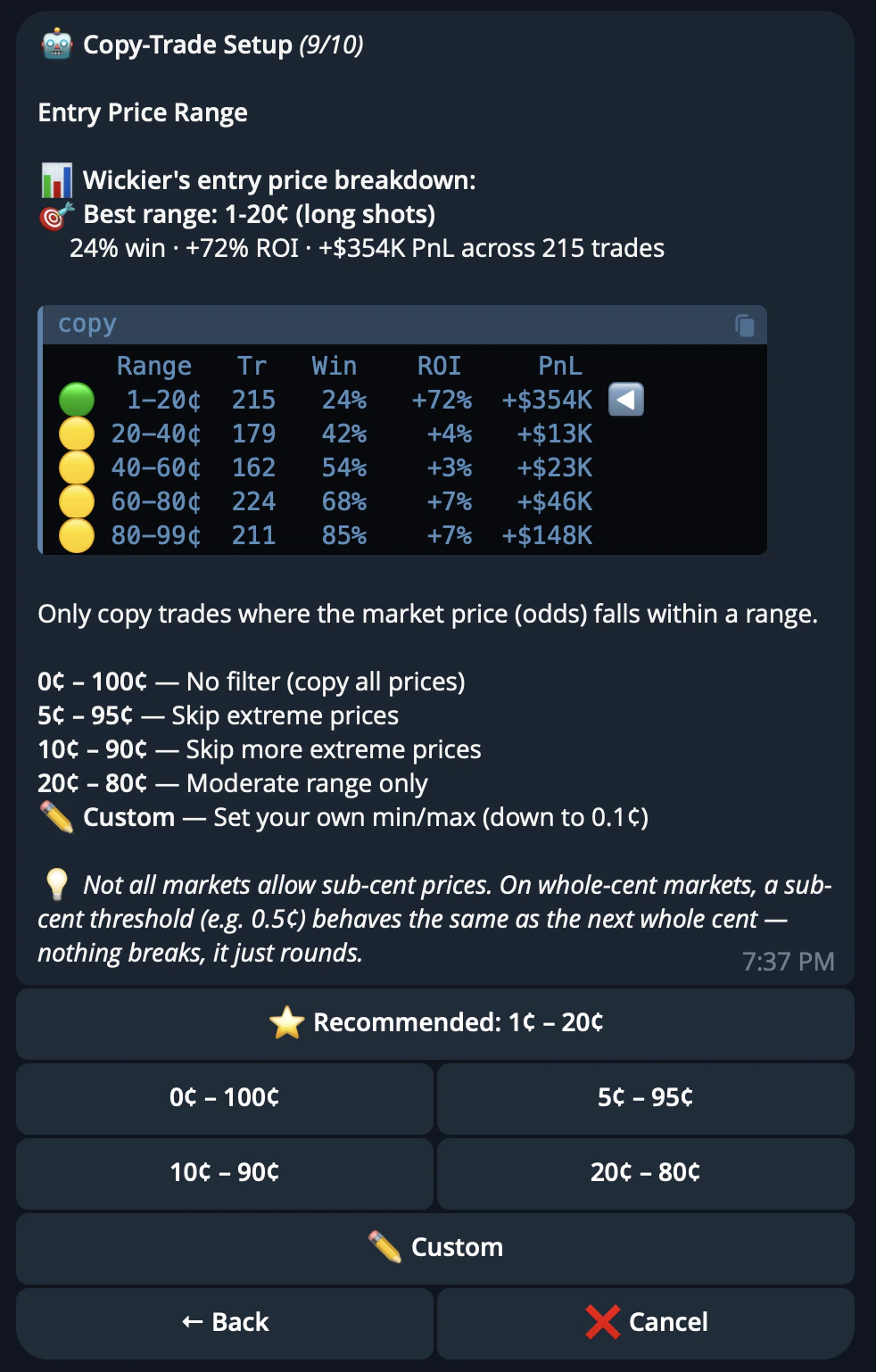
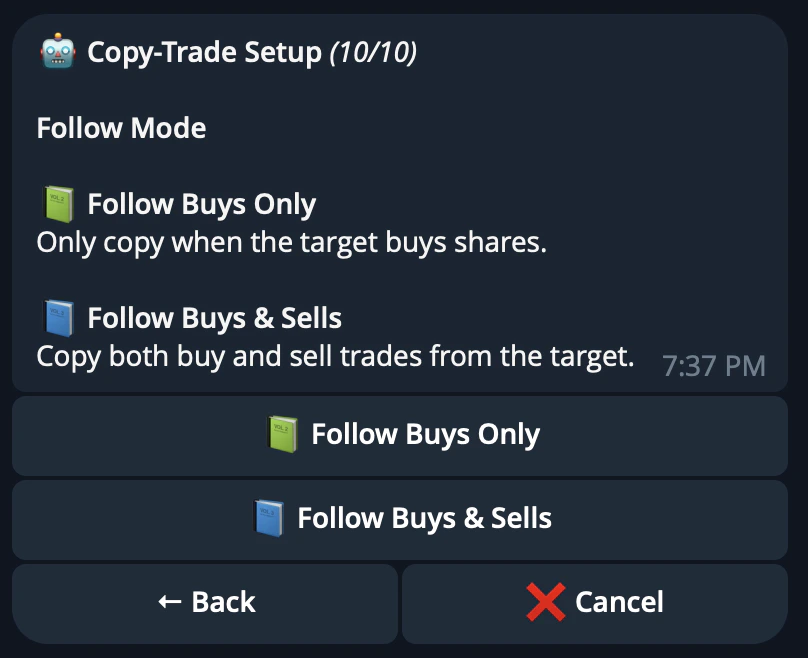
| Filter      | Description                                                  |
| ----------- | ------------------------------------------------------------ |
| Budget      | Limits how much can be allocated to the task                 |
| Slippage    | Controls the maximum price movement allowed during execution |
| Price Range | Limits copying to trades within your selected price range    |
| Follow Mode | Defines how closely CRISP should mirror the source wallet    |

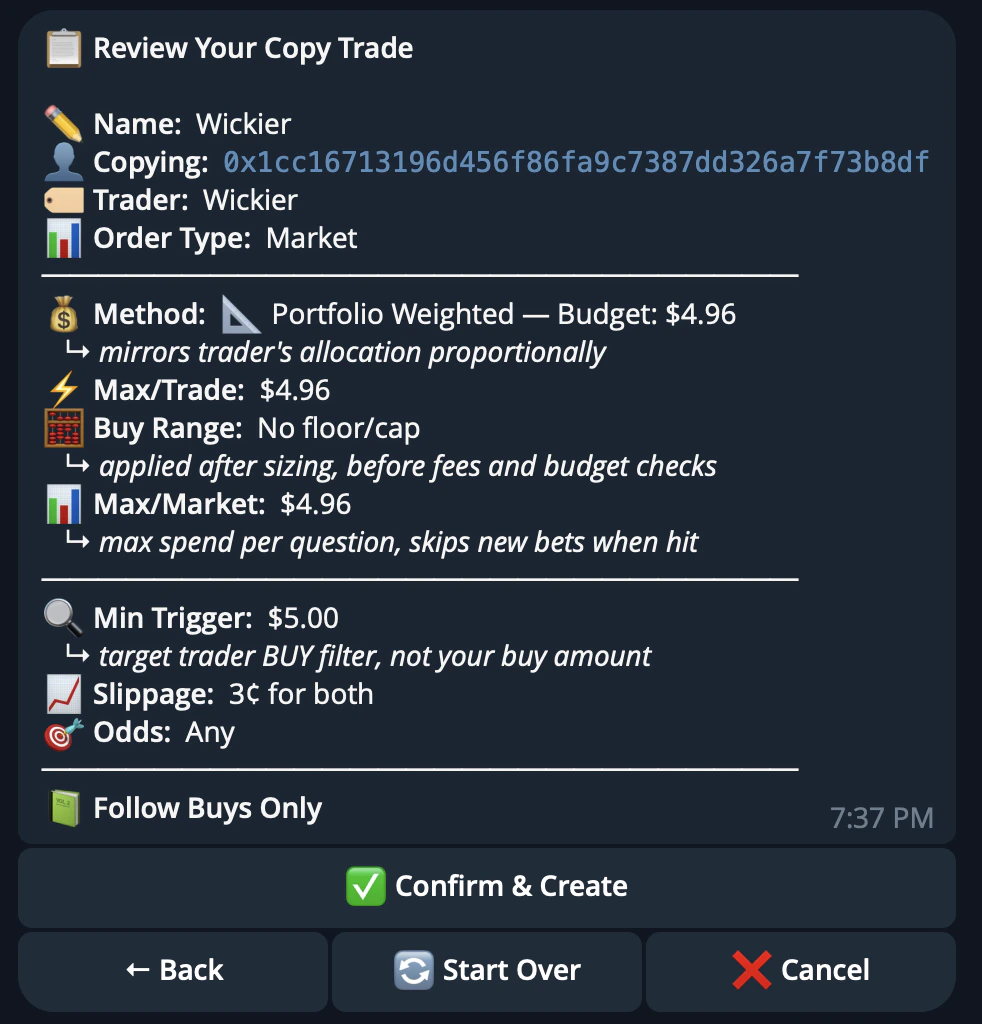
The default settings are designed to be practical for most users, such as a **USD 5 minimum trigger** and **3c slippage**.

## Confirm and manage

Review your settings and confirm the task.

<div
  style={{
backgroundColor: "#0b1117",
backgroundImage:
  "linear-gradient(rgba(255,255,255,0.04) 1px, transparent 1px), linear-gradient(90deg, rgba(255,255,255,0.04) 1px, transparent 1px)",
backgroundSize: "40px 40px",
border: "1px solid rgba(255,255,255,0.08)",
borderRadius: "16px",
margin: "32px 0",
padding: "40px 32px",
display: "flex",
justifyContent: "center",
alignItems: "center",
minHeight: "400px",
}}
>
  <img
    src="https://mintcdn.com/crisp-4fe59a67/Gx5OcnUze2EDFx4o/images/telegrambot/confirm.png?fit=max&auto=format&n=Gx5OcnUze2EDFx4o&q=85&s=9494608e67430b51b275f623391b4dc6"
    alt="CRISP Telegram bot copytrade confirmation screen"
    style={{
  width: "min(520px, 100%)",
  borderRadius: "14px",
  boxShadow: "0 24px 60px rgba(0,0,0,0.45)",
}}
    width="982"
    height="1024"
    data-path="images/telegrambot/confirm.png"
  />
</div>

Once confirmed, trades begin mirroring immediately. You can manage active tasks from the `/copytrade` menu, including starting, stopping, or editing task settings.

Users can run up to **5 active copytrade tasks** at once, with a maximum of **20 total tasks** per account including stopped tasks.