> ## Documentation Index
> Fetch the complete documentation index at: https://docs.crisp.trade/llms.txt
> Use this file to discover all available pages before exploring further.
# Explore Tab
> The main discovery hub on CRISP
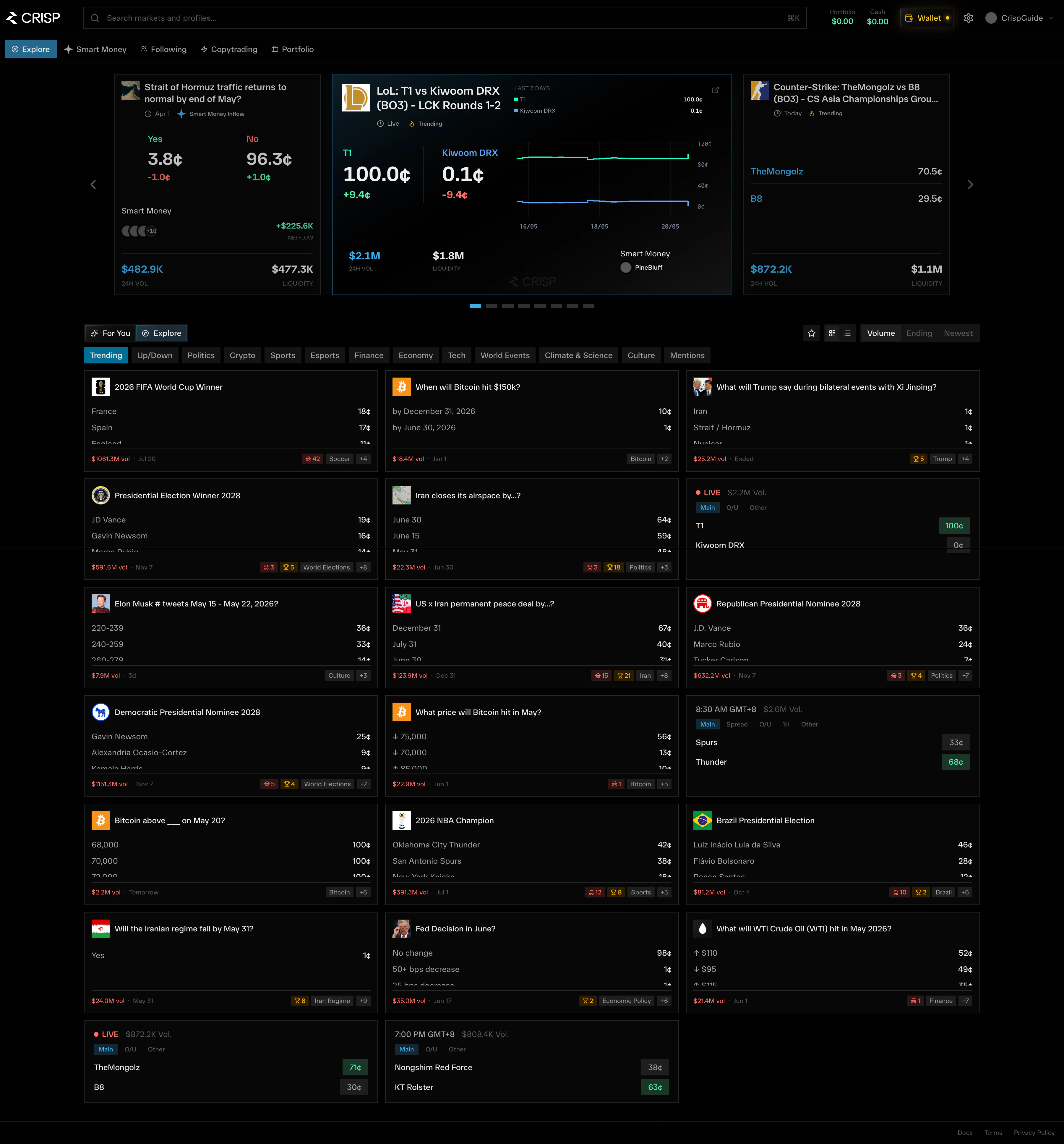
The **Explore** tab is the main discovery hub on CRISP. It helps users find active prediction markets, trending opportunities, smart money movements, and high-liquidity events across different categories.
Explore is designed for users who want to quickly understand what is moving, where capital is flowing, and which markets may be worth deeper research.
 ## What You Can Do on Explore
On the Explore page, users can:
* Discover featured and trending prediction markets
* Track markets with notable smart money inflows
* Browse markets by category such as Politics, Crypto, Sports, and World Events
* View real-time market prices, liquidity, and 24H volume
* Identify top movers and markets with strong activity
* Search for specific markets, profiles, or traders
* Switch between personalized recommendations and broader market discovery
## Featured Market Carousel
At the top of the Explore page, CRISP highlights selected markets in a featured carousel.
These cards surface markets that may be relevant because of:
* High trading volume
* Strong smart money inflow
* Recent price movement
* Market relevance or trending narratives
* Important upcoming resolution dates
Each featured market card may show:
| Field | Description |
| ------------------ | ------------------------------- |
| Market title | The prediction market name |
| Event date | Resolution or event date |
| Current prices | YES and NO outcome prices |
| Price changes | Recent price movement |
| Smart money inflow | Capital from tracked wallets |
| Netflow amount | Net capital flow direction |
| 24H volume | Trading volume in last 24 hours |
| Liquidity | Available market liquidity |
| Top movers | Notable traders in the market |
This section is meant to help users quickly spot markets that deserve attention without needing to manually scan the full market list.
## Smart Money Signals
Some markets include **Smart Money Inflow** indicators.
Smart Money signals help users understand when experienced, profitable, or notable wallets are entering a market. This gives users an additional layer of context beyond price and volume alone.
For example, a market may show:
* Number of smart money wallets involved
* Netflow from smart money wallets
* Direction of activity
* Recent inflow amount
This allows users to identify where stronger traders may be positioning before making their own decision.
## Market Categories
Below the featured carousel, users can filter markets by category.
Current categories include:
* **All**
* **Politics**
* **Crypto**
* **Sports**
* **World Events**
These filters help users focus only on the markets they care about. For example, a sports trader can quickly browse NBA, football, esports, or other sports-related markets, while a macro-focused user can focus on politics and world events.
## For You and Explore Modes
The Explore page includes two main browsing modes:
### For You
**For You** shows personalized market recommendations based on user activity, interests, and relevant signals.
This is useful for users who want CRISP to surface markets that may match their trading behavior or research preferences.
### Explore
**Explore** gives users a broader view of available markets across the platform.
This is useful when users want to discover new markets outside of their usual categories or search for broader opportunities.
## What You Can Do on Explore
On the Explore page, users can:
* Discover featured and trending prediction markets
* Track markets with notable smart money inflows
* Browse markets by category such as Politics, Crypto, Sports, and World Events
* View real-time market prices, liquidity, and 24H volume
* Identify top movers and markets with strong activity
* Search for specific markets, profiles, or traders
* Switch between personalized recommendations and broader market discovery
## Featured Market Carousel
At the top of the Explore page, CRISP highlights selected markets in a featured carousel.
These cards surface markets that may be relevant because of:
* High trading volume
* Strong smart money inflow
* Recent price movement
* Market relevance or trending narratives
* Important upcoming resolution dates
Each featured market card may show:
| Field | Description |
| ------------------ | ------------------------------- |
| Market title | The prediction market name |
| Event date | Resolution or event date |
| Current prices | YES and NO outcome prices |
| Price changes | Recent price movement |
| Smart money inflow | Capital from tracked wallets |
| Netflow amount | Net capital flow direction |
| 24H volume | Trading volume in last 24 hours |
| Liquidity | Available market liquidity |
| Top movers | Notable traders in the market |
This section is meant to help users quickly spot markets that deserve attention without needing to manually scan the full market list.
## Smart Money Signals
Some markets include **Smart Money Inflow** indicators.
Smart Money signals help users understand when experienced, profitable, or notable wallets are entering a market. This gives users an additional layer of context beyond price and volume alone.
For example, a market may show:
* Number of smart money wallets involved
* Netflow from smart money wallets
* Direction of activity
* Recent inflow amount
This allows users to identify where stronger traders may be positioning before making their own decision.
## Market Categories
Below the featured carousel, users can filter markets by category.
Current categories include:
* **All**
* **Politics**
* **Crypto**
* **Sports**
* **World Events**
These filters help users focus only on the markets they care about. For example, a sports trader can quickly browse NBA, football, esports, or other sports-related markets, while a macro-focused user can focus on politics and world events.
## For You and Explore Modes
The Explore page includes two main browsing modes:
### For You
**For You** shows personalized market recommendations based on user activity, interests, and relevant signals.
This is useful for users who want CRISP to surface markets that may match their trading behavior or research preferences.
### Explore
**Explore** gives users a broader view of available markets across the platform.
This is useful when users want to discover new markets outside of their usual categories or search for broader opportunities.